· Marcus Delgado · Field Reports · 19 min read
Bullhorn Alternatives for Small Staffing Agencies: 6 Options and What They Really Cost (2026)
Bullhorn is built for scale most small desks don't have, and priced like it. Here are six real Bullhorn alternatives for a sub-20-seat staffing agency, the published per-seat numbers, the migration traps, and who each one is actually right for.
It is renewal week, the Bullhorn invoice lands, and you do the math you have been avoiding. Four recruiters, Core seats, another price bump baked into the contract, and a feature list where you use maybe a third of what you pay for. The platform is not bad. It is built for an agency three times your size, and it is charging you like one. So you open a new tab and type the search half the desks in this business eventually type: a Bullhorn alternative for a small shop.
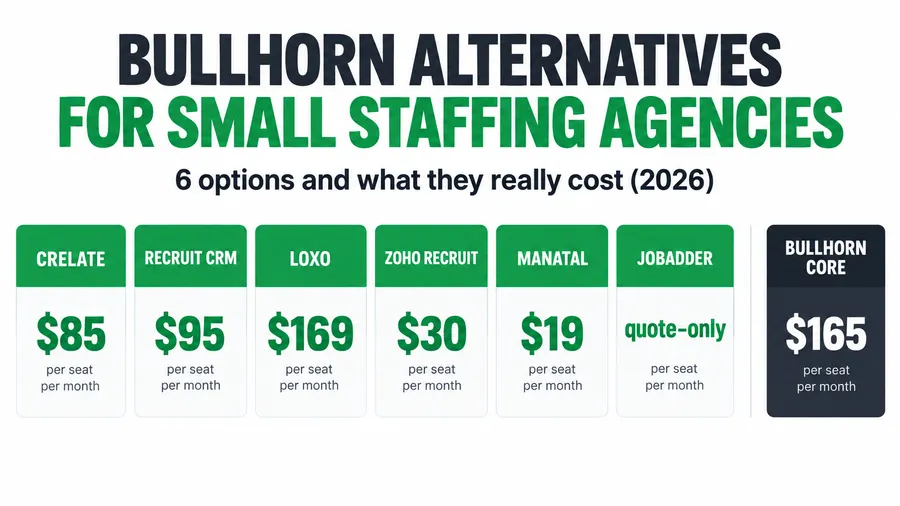
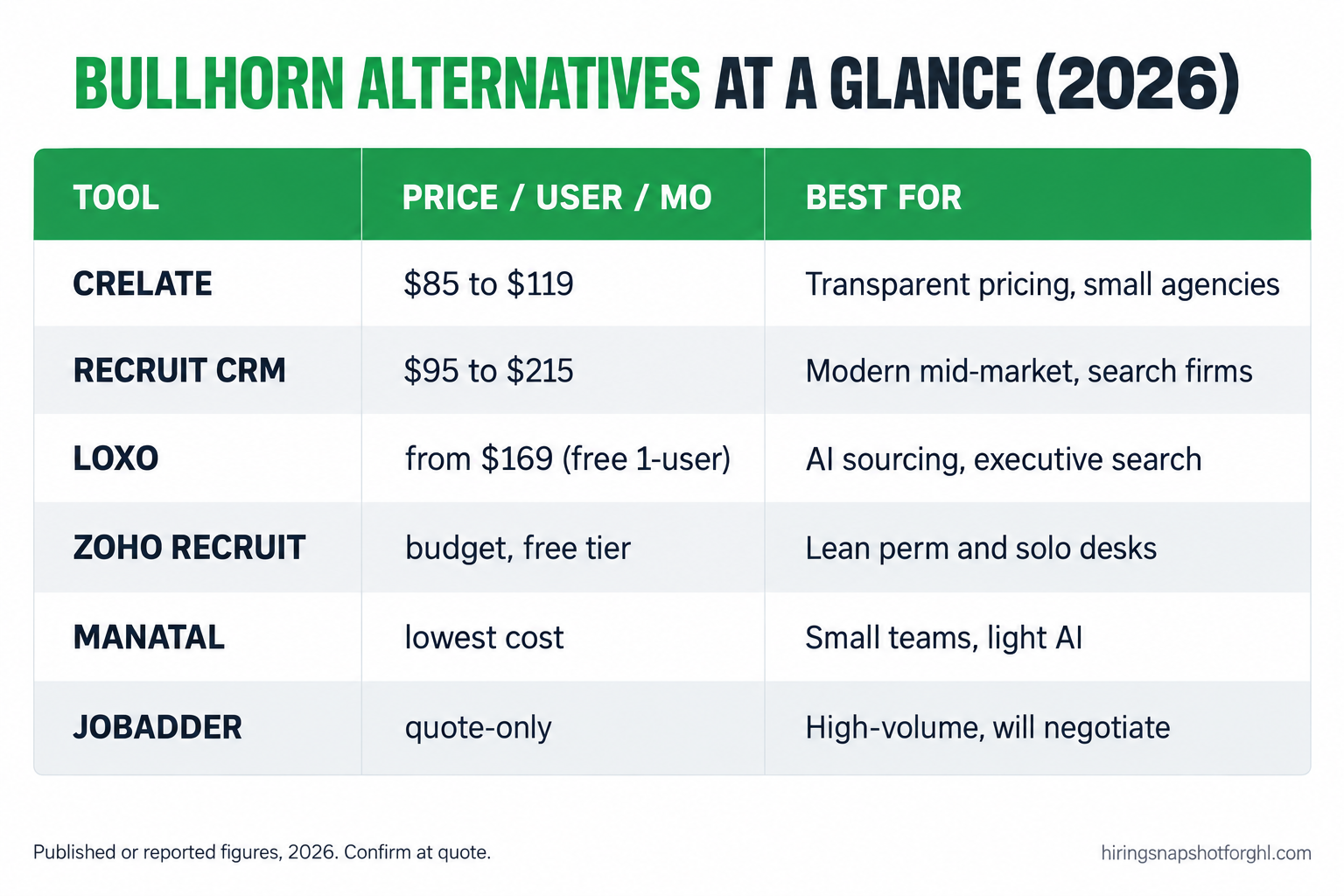
The short answer: for a sub-20-seat staffing agency in 2026, the strongest Bullhorn alternatives are Crelate ($85 to $119 per user), Recruit CRM (reported $95 to $215 per user), Loxo (from $169 per user, with a free single-user tier), Zoho Recruit and Manatal at the budget end, and JobAdder if you can stomach a quote-only sales cycle. None of them is “Bullhorn but cheaper” across the board. Each wins on a different axis, price transparency, texting, AI sourcing, temp versus perm fit, and the right pick depends on how your desk actually runs, not on the feature grid. This is the operator’s teardown of the real options, the numbers, the migration traps, and who each tool is genuinely right for.
Key takeaways
- Bullhorn’s small-agency tiers are $99 (Starter) and $165 (Core) per user per month, verified 2026, and fully loaded enterprise seats run roughly $200 to $315+. Small desks routinely pay Core rates for capability they never touch.
- The most transparent alternative is Crelate: $85 per user (Essentials) and $119 (Business), published, with no 5-seat minimum.
- The AI you saw in the demo is usually on a higher, sales-led tier. Loxo puts its sourcing engine above the published $169 Basic plan.
- Per-seat pricing is what you are actually escaping. Every alternative here except a flat-cost build charges by the head, so your bill climbs each time you hire.
- Migration is the real cost, not the license. Budget for a data export, field mapping, and a parallel-run week. The checklist below is the one I run.
Table of contents
- Why small staffing agencies outgrow Bullhorn’s pricing, not its features
- The 8 criteria that actually matter when you leave Bullhorn
- The six alternatives, one by one
- Published per-seat prices, side by side
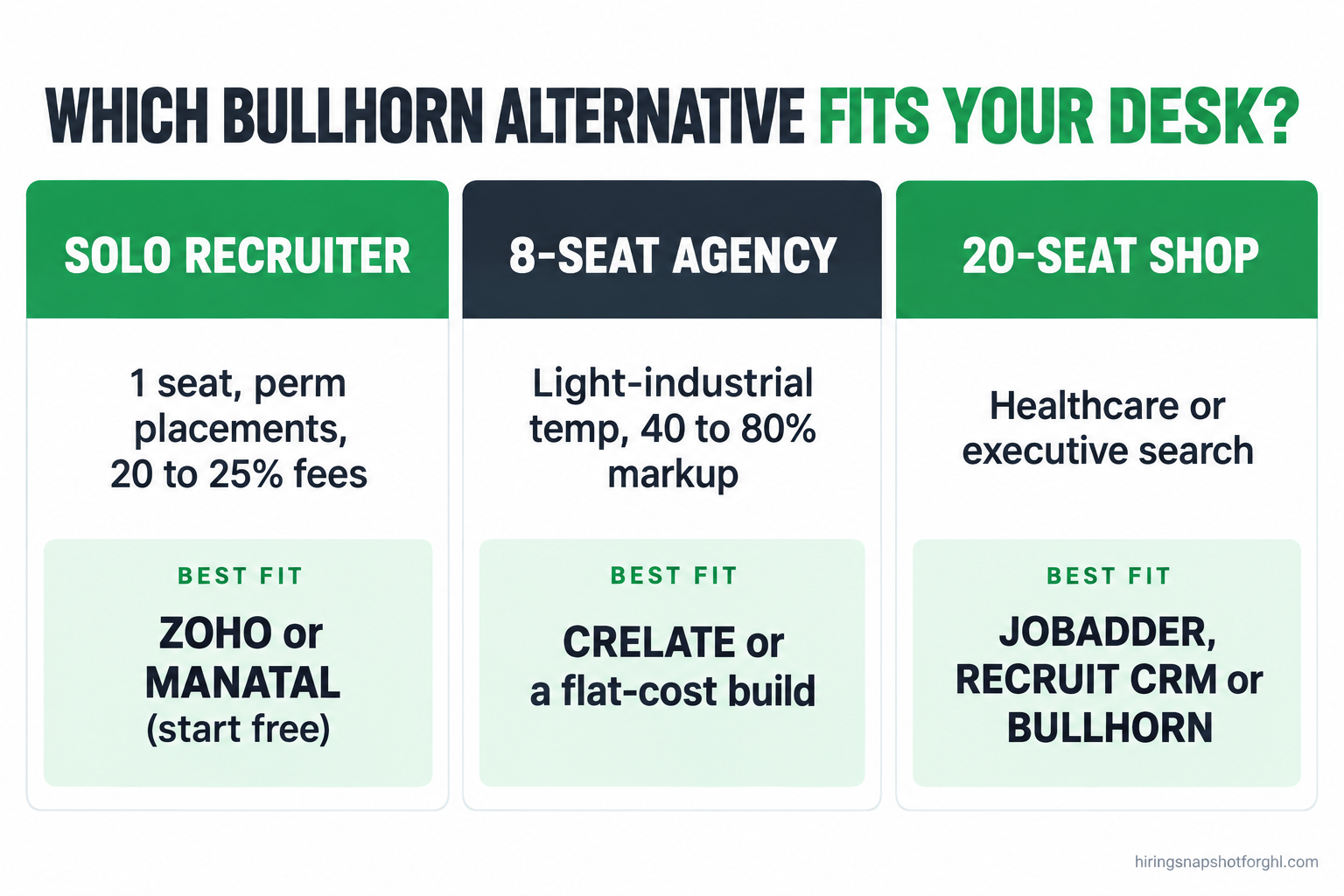
- Three real scenarios: solo, 8-seat, and 20-seat
- How leaving Bullhorn breaks, and the cutover checklist
- The compliance cost every buyer forgets
- Common objections, answered
- FAQ
Why small staffing agencies outgrow Bullhorn’s pricing, not its features
There are roughly 27,000 staffing and recruiting companies in the United States running about 54,000 offices, and together they put around 2.2 million temporary and contract workers to work in an average week (American Staffing Association). Most of them are small, and most of them are not the customer Bullhorn is built for. That is the whole story.
Bullhorn is the category standard for a reason: deep VMS integrations, heavy reporting, an add-on marketplace, and search-and-match that earns its keep at volume. The problem is not quality. It is that its economics assume a firm with the seat count and process maturity to use all of it. Its published small-agency tiers are $99 per user per month for Starter and $165 for Core (reported and verified 2026), and above Core the pricing goes custom, with third-party trackers placing fully loaded enterprise seats at roughly $200 to $315 or more per user per month (Pin). Run that at a four-recruiter desk on Core and you are near $8,000 a year in license fees alone, before implementation, add-ons, or the annual escalator, for a tool where your daily workflow is candidate capture, texting, scheduling, and follow-up.
That is the pattern that sends small operators shopping. Not a feature Bullhorn lacks, a price that stopped matching the size of the desk. So the real question is not “what is as powerful as Bullhorn.” It is “what does my desk do every day, and what is the cheapest defensible way to do exactly that.” Answer that honestly and the alternative picks itself.
The 8 criteria that actually matter when you leave Bullhorn
Feature grids are noise. When you move off Bullhorn, eight things decide whether the switch was worth it. Score every option below against these, in this order:
- Price transparency and true per-seat cost. Is the number published, or do you have to sit through a demo to learn it? A hidden price is a negotiating position, not a courtesy.
- Seat minimums and per-seat creep. Does the entry tier force a minimum seat count, and how much does the bill rise per hire? This is the tax you are trying to escape.
- Migration and implementation lift. Can you export your Bullhorn data cleanly and map it, or does the new vendor charge a four-figure onboarding fee to do it for you?
- Texting, SMS, and TCPA. Is two-way candidate texting built in or a paid add-on, and does it carry consent capture and A2P registration? Recruiting lives on text now.
- AI sourcing and matching, and where it hides. Is the AI you saw in the marketing in your tier, or on a higher sales-led plan behind a second paywall?
- Temp and pay-and-bill versus perm. Light-industrial and healthcare desks need timesheets, redeployment, and back-office hooks; search and perm desks do not.
- Job-board multiposting and integrations. Indeed, ZipRecruiter, and LinkedIn posting, plus whatever you already run: native or bolted on?
- Data export and lock-in. If you leave again, do you get a full export, in what format, and at what cost? Ask before you sign, not after.
The tools below each win on some of these and lose on others, which is exactly why “best Bullhorn alternative” has no single answer.
The six alternatives, one by one
Prices below are published or third-party-reported figures as of 2026. Where a vendor hides pricing behind a demo, I say so and cite the reported range. Confirm the live number for your seat count before you sign.
Crelate: the transparent anchor, and the default recommendation
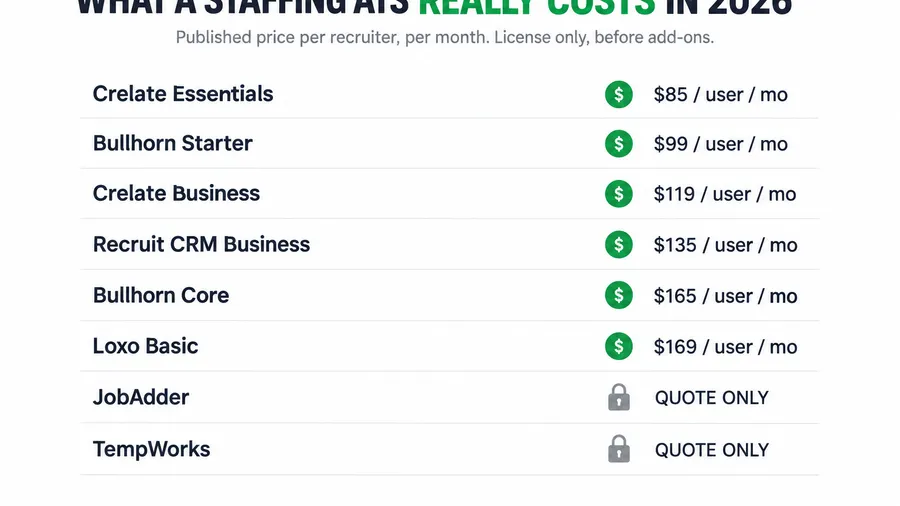
Crelate has the most honest pricing page in the category, which makes it the tool everyone else should be measured against. Essentials is $85 per user per month billed annually and supports up to two users; Business is $119 per user annually, or $149 billed monthly (AvaHR). Business Plus and the Platform tier move to custom quotes, and there is no five-seat minimum, whatever a competitor’s rep may tell you.
What to watch: texting, email campaigns, and contact enrichment are billed separately, and the contract carries a reported 7% or CPI-linked annual escalator, so a $119 seat becomes closer to $150 effective by year two. Who it is right for: small and mid-size agencies that want a real ATS and CRM with published, predictable pricing and are comfortable adding texting and enrichment a la carte. For most sub-20-seat desks leaving Bullhorn purely on price, this is the safe first call.
Loxo: AI-forward, with the AI on the upper tier
Loxo markets itself as an AI-first talent platform and is genuinely strong at sourcing. Its Basic plan is a published $169 per user per month, and it offers a free single-user tier that is a real way to trial the product (Glozo). The catch is where the AI lives. Basic is the ATS, CRM, job distribution, and resume parsing; Loxo Source, the 1.2-billion-profile database, the AI agents, and the contact credits sit on the sales-led Professional and Enterprise tiers (Pin), with a reported 5% annual renewal increase.
Who it is right for: search and executive-recruiting firms that will use the sourcing engine and can justify Professional pricing. Who should be careful: an agency that signs up for Basic expecting the AI it saw in the marketing, then finds it behind a second, unpublished paywall. For a light-industrial temp desk, Loxo is more horsepower than you need.
Recruit CRM: modern mid-market, lightly published
Recruit CRM sits in the mid-market and is popular with recruiting and search firms that want a clean, modern interface with GPT-style tools. Third-party trackers report tiers of roughly Pro $95, Business $135, and Enterprise $215 per user per month billed annually, with monthly billing higher, and reported figures vary by source (AvaHR), so treat these as a guide and confirm at quote. What to watch: enrichment, advanced automation, analytics, and multiposting are separate credits, the same pattern as everyone else. Who it is right for: perm and search agencies wanting a tidy, well-designed ATS at a mid-market seat price, with less of the enterprise weight Bullhorn carries.
Zoho Recruit: the budget workhorse for a lean desk
Zoho Recruit is what small operators reach for when the priority is cost, especially if they already live in the Zoho ecosystem. It publishes real, low per-seat numbers and a genuine free single-user tier, which makes it the cheapest credible ATS here. What to watch: it is a general recruiting ATS, not a purpose-built staffing platform, so temp timesheets, pay-and-bill, and redeployment are weak or absent and you will lean on integrations. Who it is right for: budget-conscious perm and contingency desks that value price and configurability over staffing-specific back office.
Manatal: clean, cheap, AI-touched
Manatal is a modern, low-cost ATS with an unusually clean interface and AI candidate recommendations, aimed at small agencies that find Bullhorn overkill. Its published per-seat pricing is the lowest on this list, which is the whole pitch. What to watch: like Zoho, it is built for recruiting in general rather than high-volume light-industrial staffing, so if your model runs on timesheets and same-week redeployment, test that hard first. Who it is right for: small perm, agency, and RPO desks that want a modern, inexpensive ATS with light AI and no pay-and-bill.
JobAdder: capable, but you have to earn the price
JobAdder is a capable staffing and recruiting platform, popular in high-volume environments. The catch is opacity. JobAdder publishes no per-user price for any of its plans. Every plan on its pricing page routes to a “request pricing” form, and third-party estimates circulate in the $95 to $160 or more per user per month range (ATLAS). Its tiers gate by team size: Recruiter Lite covers 1 to 5 users, Essential 6 to 20, and Pro 21 and up. Who it is right for: agencies whose model genuinely needs what JobAdder bundles and who are prepared to negotiate. A hidden price means you are meant to anchor on the demo, not the dollar, so bring the export and pricing questions below to the call.
Published per-seat prices, side by side
Here are the published or reported entry prices on one axis. Quote-only JobAdder is omitted because there is no honest number to plot. Read this as an anchor, not a final quote, because add-ons and escalators move every one of these.
The spread tells the story. Manatal and Zoho win on sticker price but are general recruiting tools. Crelate and Recruit CRM sit in the staffing-aware middle, and Loxo costs more because you are buying a sourcing engine. Bullhorn Core, the seat most small desks actually hold, sits above all of them at $165 before a single add-on.
Three real scenarios: solo, 8-seat, and 20-seat
The right alternative changes completely with the size and model of the desk. Run the same question three ways.
The solo contingency recruiter, perm placements, 20 to 25% fees. You are one seat. Your priorities are cost, clean candidate tracking, and getting out of spreadsheets, not enterprise depth. Zoho Recruit’s free single-user tier or Manatal’s low seat price gets you a real ATS for the price of lunch, and Loxo’s free single-user plan is worth trialing if sourcing is your bottleneck. Bullhorn at $99 to $165 for one seat is hard to justify. Verdict: start free or near-free, upgrade only when a second recruiter joins.
The 8-recruiter light-industrial agency, temp and temp-to-hire, 40 to 80% markup. Now the model matters. You need texting, redeployment, timesheets, and speed, and per-seat creep is a real line item because you are hiring. Eight Bullhorn Core seats run roughly $15,800 a year in license alone; Crelate Business at eight seats is about $11,400, with texting on top. This is also the size where a flat-cost build starts to win outright, because a per-seat bill now rises every time you add a recruiter. Verdict: price Crelate against a flat-cost stack, and weight redeployment and texting heavily.
The 20-recruiter healthcare or executive-search shop. At this size you have the process maturity and seat volume where a purpose-built platform earns its price. JobAdder’s quote-only model is worth entertaining, Recruit CRM Enterprise fits a search-heavy desk, and Bullhorn itself may genuinely be right again because you will use the depth. At 20 seats the enterprise features stop being waste. Verdict: the one size where a full staffing platform can be the correct call.
How leaving Bullhorn breaks, and the cutover checklist
The license is not the risk. The migration is. Here is how a Bullhorn exit actually breaks, and the checklist I run to keep it clean.
How it breaks. Three ways, every time. First, the data export is messier than you expect: custom fields, notes, and candidate history do not map one-to-one, and a lazy import loses your placement history. Second, you cut over cold, kill Bullhorn on Friday, and Monday your recruiters cannot find a candidate, so they quietly go back to a spreadsheet and the new ATS dies in week one. Third, job-board and email integrations break silently, and you find out when a candidate says they never got the confirmation. You beat all three with a parallel-run week and a mapped export. Copy this and work it top to bottom.
The Bullhorn exit checklist (steal this)
Two weeks before cutover:
- Request a full data export from Bullhorn in writing, in CSV or the format the new vendor accepts, and confirm it includes candidates, contacts, companies, notes, and placement history.
- Ask the new vendor exactly which fields import natively and which need manual mapping. Get it in a spreadsheet.
- List every integration you rely on: job boards, email, texting, calendar, background-check, payroll. Each one has to be re-connected and tested, not assumed.
Cutover week (run both systems in parallel):
- Import into the new system and spot-check 20 real candidate records against Bullhorn for lost fields.
- Post one live job through the new system end to end: capture, text, schedule, confirm. Watch the confirmation actually arrive.
- Move one active requisition fully into the new tool and work it there while Bullhorn stays read-only.
Before you cancel Bullhorn:
- Confirm your export is downloaded and stored, not just “available in the portal.”
- Read the contract’s notice period and auto-renewal window. Cancel in writing inside it.
- Keep the export archived for the length of any record-retention obligation you carry.
The demo-call questions matter as much as the export. Whatever tool you pick, ask before you sign: the exact per-user price on annual billing for the tier that includes everything you were shown; which of texting, AI sourcing, and multiposting are add-ons; the annual escalator; and the one buyers forget, “If I leave, do I get a full export of my data, in what format, and is there a fee?” If you are moving the other way, onto a flat-cost stack, I walked through a clean cutover in migrating a staffing agency to GoHighLevel.
The compliance cost every buyer forgets
There is a cost that never appears on a pricing page and is climbing fast: compliance with the new rules on automated hiring tools. If the alternative you pick scores, ranks, or screens candidates with AI, and most now market exactly that, some jurisdictions regulate it directly.
New York City’s Local Law 144 is already in force. It requires an employer or employment agency using an automated employment decision tool to commission an independent bias audit within the prior year, publish a summary of the results, and give candidates at least 10 business days’ notice before the tool is used on them; the Department of Consumer and Worker Protection has enforced it since July 5, 2023 (NYC DCWP). Colorado’s SB 24-205, the first comprehensive US AI law, reaches high-risk hiring tools too, though its effective date has slipped, so confirm current status (Colorado General Assembly). Federal Fair Credit Reporting Act rules still govern disclosure and adverse-action steps on any third-party background check (FTC).
The buyer’s move: ask any AI-forward vendor whether their tool triggers a bias-audit obligation in the states you recruit in, and who owns the audit and the candidate notice. Building consent, notice, and opt-out into the workflow from the start is cheaper than a penalty, the same discipline behind TCPA-compliant recruiting texts and the 2026 AI hiring law rundown.
Common objections, answered
“Isn’t Bullhorn the safe choice? Nobody gets fired for buying it.” At the right size, yes. If you have 20-plus seats and use its depth, staying is defensible. But “safe” that costs $165 a seat for features you never open is not safe, it is expensive. Safe is running your real three-year total both ways and picking on the number, not the brand.
“I already pay for Bullhorn and my data is in there. Isn’t switching too risky?” The data is exactly why people stay too long, and it is also exportable. The risk is real but it is a project you can run, not a wall. Use the checklist above, run both systems in parallel for a week, and confirm your export before you cancel. The agencies that get hurt are the ones who cut over cold.
“Do I need to be technical to run something that isn’t Bullhorn?” No, and this is the strongest argument for a done-for-you build over a blank ATS, because the cheaper tools here still expect you to configure them. That is the entire reason the Hiring Snapshot ships pre-built rather than as an empty GoHighLevel account: the workflows, cadences, and pipeline come installed within one business day, so you are running recruiting automation, not assembling it. If you would rather hand off the day to day, a trained GHL virtual assistant can run desk operations for you.
“Won’t a cheaper tool cost me in missing staffing features?” It can, which is why the criteria order matters. A budget ATS like Zoho or Manatal is a real saving for a perm or search desk and a real trap for a high-volume light-industrial desk that lives on timesheets and redeployment. Match the tool to the model. That is the whole game.
FAQ
What is the best Bullhorn alternative for a small staffing agency?
There is no single best. For transparent pricing and a real staffing ATS, Crelate at $85 to $119 per user is the safe default. For the lowest cost, Zoho Recruit and Manatal publish the cheapest seats and offer free or near-free entry tiers, though they are general recruiting tools rather than purpose-built staffing platforms. For AI sourcing, Loxo is strongest, with the caveat that its best AI sits on a higher sales-led tier. For high-volume desks willing to negotiate, JobAdder is capable but quote-only. Match the tool to how your desk actually runs.
How much cheaper are Bullhorn alternatives?
It depends on the tool. Bullhorn’s small-agency tiers are $99 (Starter) and $165 (Core) per user per month. Crelate publishes $85 to $119, Recruit CRM is reported around $95 to $215 by tier, and Loxo starts at $169. Budget tools like Zoho Recruit and Manatal are dramatically cheaper on sticker price but carry fewer staffing-specific features. The bigger saving for a growing agency often comes from leaving per-seat pricing altogether, because a flat-cost model stops your software bill from rising every time you hire.
Does Crelate really have no 5-seat minimum?
Correct. Crelate publishes Essentials at $85 per user per month billed annually, supporting up to two users, and Business at $119 per user, with no five-seat minimum. If a rep tells you a minimum seat count is required on the published tiers, treat that as a negotiating tactic and confirm against the live pricing page.
Why won’t JobAdder show its price?
JobAdder is quote-only. Every plan on its pricing page routes to a request-pricing form, and it gates tiers by team size (Recruiter Lite for 1 to 5 users, Essential for 6 to 20, Pro for 21 and up). Hiding the price lets a rep scope your seat count and urgency before naming a number, which favors the vendor. Third-party estimates put it around $95 to $160 or more per user per month, but you will not get a firm figure without a call.
Is it hard to migrate off Bullhorn?
It is a manageable project, not a wall. The risks are a messy data export that loses custom fields and placement history, a cold cutover that sends recruiters back to spreadsheets, and integrations that break silently. You avoid all three by requesting a full mapped export, running the old and new systems in parallel for a week, and testing one live job end to end before you cancel. Confirm your export is downloaded and stored before you kill the Bullhorn contract.
About the author
Marcus Delgado is the Staffing Agency Growth Lead behind the Hiring Snapshot. He ran a light-industrial staffing desk before joining the team to focus on agency growth, and he thinks in placement economics: fill rates, redeploys, and gross margin per requisition. His posts lean on real desk math, not vanity metrics.
Related reading
- Staffing ATS Pricing in 2026: What Bullhorn, Crelate, Loxo and JobAdder Really Cost
- GoHighLevel vs Bullhorn for Staffing Agencies: An Honest Comparison
- Migrating a Staffing Agency to GoHighLevel: The Clean Cutover Playbook
- Staffing Agency Bill Rate & Markup: The Margin Math That Keeps a Desk Profitable
- Staffing Industry Benchmarks 2026: The Recruiting Metrics That Actually Matter
Tired of a software bill that climbs every time you hire? See how the Hiring Snapshot works, then get the full build for a one-time $997, installed within one business day.