· Marcus Delgado · Field Reports · 14 min read
Custom Recruiting Software for San Diego Staffing Agencies: Candidate & Client Portals That Cut Admin (2026)
San Diego staffing desks lose hours a day to re-keying data and answering 'where's my application?' emails. Here's what custom candidate and client portals actually do, what they cost, and when a build beats another off-the-shelf ATS seat.
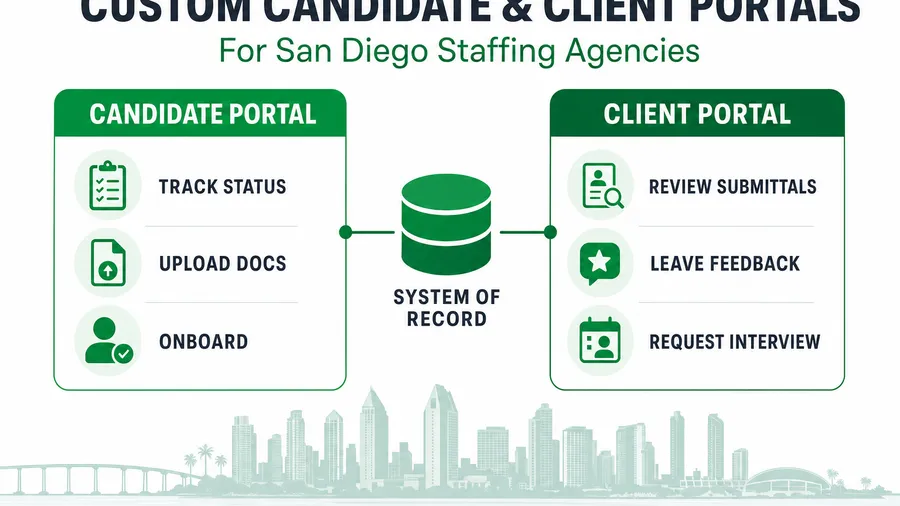
Short answer: a San Diego staffing agency should reach for custom software — specifically branded candidate and client portals wired to whatever it already uses as a system of record — the moment recruiters are spending more time re-keying data and answering “where’s my application?” than actually placing people. A candidate portal lets applicants track status, upload documents, and onboard themselves; a client portal lets hiring managers review submittals, leave feedback, and request interviews without a single email thread. Both plug into your existing ATS, a purpose-built one, or GoHighLevel — and both exist to give your most expensive people their day back. This is the honest, numbers-first breakdown of what those portals do, what they cost, and when a build beats buying one more seat of a boxed tool.
Key takeaways
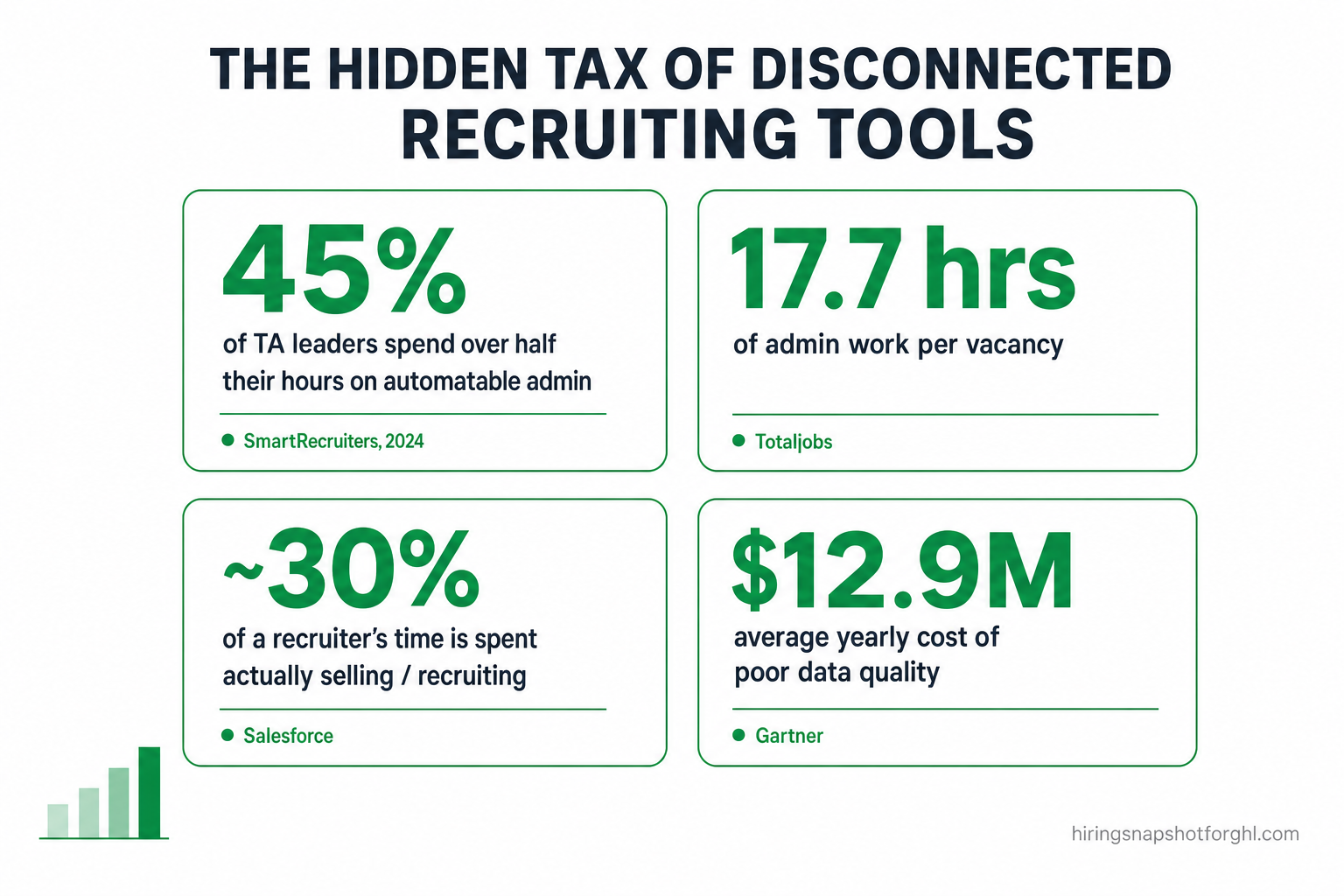
- Recruiters are drowning in admin. In a 2024 SmartRecruiters survey of 533 talent professionals, 45% of talent-acquisition leaders said they spend more than half their working hours on administrative tasks that could be automated (SmartRecruiters, via Shortlistd). A separate study put admin at 17.7 hours per vacancy — more than two working days per hire (Totaljobs, via Staffing Industry Analysts).
- Your clients want self-service. 67% of B2B buyers now prefer a rep-free experience for at least part of a purchase (Gartner, 2026) — a client portal is exactly that experience for a hiring manager.
- Your candidates want status. 53% of job seekers say they’ve been ghosted by a potential employer (iHire), and roughly 62% of applications are completed on a phone (Appcast) — so a mobile status portal is the fix.
- Disconnected tools are a tax. Gartner estimates poor data quality costs organizations $12.9M a year on average (Gartner), and workers lose about 23 minutes of focus every time they switch apps (Gloria Mark, UC Irvine).
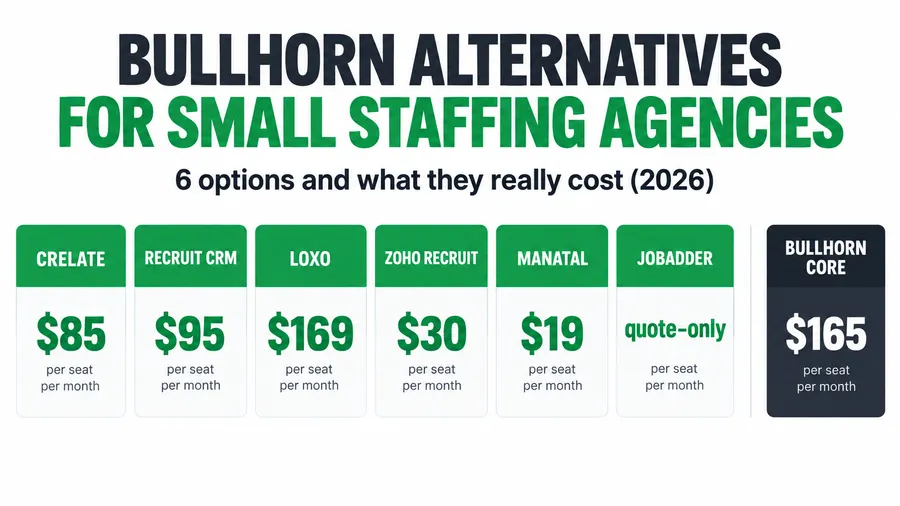
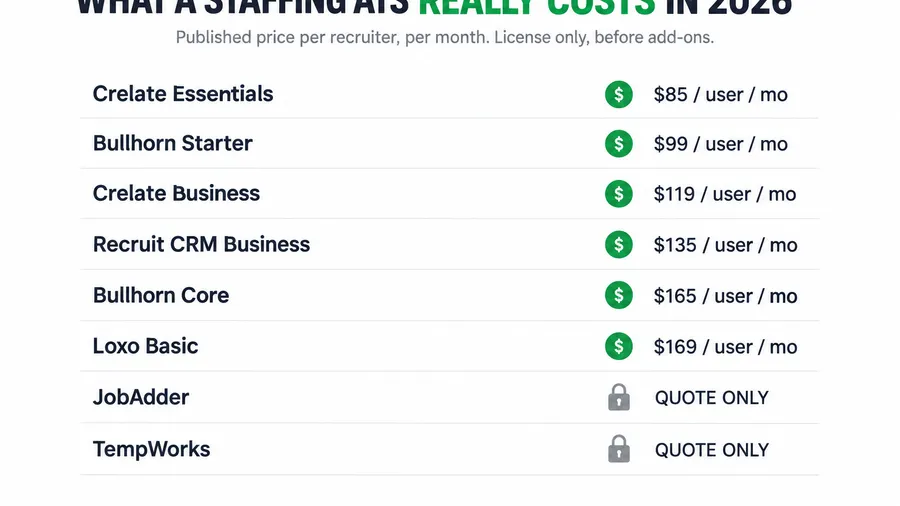
- Build vs. buy is a real decision. Off-the-shelf ATS seats run ~$99–$165/user/month and up (Bullhorn); custom is quote-based and worth it when the tool can’t model your desk.
Table of contents
- Why San Diego staffing desks feel the software gap first
- What “custom recruiting software” actually means
- The candidate portal: self-service status, uploads, onboarding
- The client portal: what your hiring managers actually want
- The hidden tax of disconnected recruiting tools
- Build vs. buy: when off-the-shelf is enough — and when it isn’t
- What custom portals cost and how to scope one
- How to start without ripping everything out
- FAQ
Why San Diego staffing desks feel the software gap first
San Diego is not a generic staffing market, and generic software shows its seams here fastest. The county carries roughly 1.58 million nonfarm jobs and an unemployment rate around 3.9% as of mid-2026 (California EDD, via KPBS) — a tight labor market where the agency that responds first usually wins the placement.
Then there’s the mix. San Diego’s life-sciences cluster alone accounts for 166,907 direct and indirect jobs and $54.1 billion in economic output across more than 2,000 companies (Biocom California Economic Impact Report), layered on top of defense contractors, big hospital systems, and a heavy tourism-and-hospitality base. A recruiter staffing sterile-fill technicians for a Torrey Pines biotech, travel nurses for a Hillcrest hospital, and cleared engineers for a defense prime is running three different compliance regimes, three different candidate journeys, and three different client expectations — inside one tool that was designed for none of them.
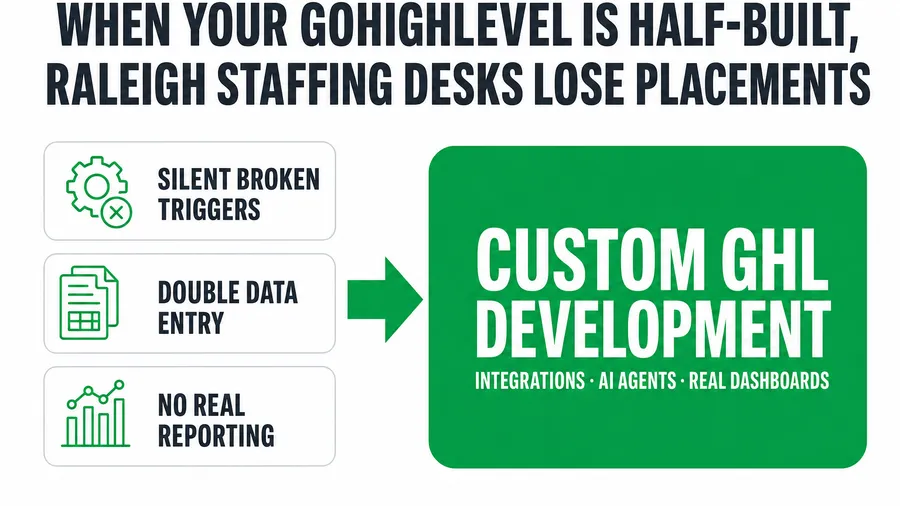
That’s the tell. When your desk has a niche a boxed ATS can’t model, the workarounds — the side spreadsheets, the copy-paste between systems, the “just email me the résumés” — quietly become the job. Custom software is how you stop bending your process to fit the tool.
What “custom recruiting software” actually means
“Custom software” sounds like a moonshot. In practice, for a staffing agency it’s a short, concrete list of things off-the-shelf tools do badly or not at all:
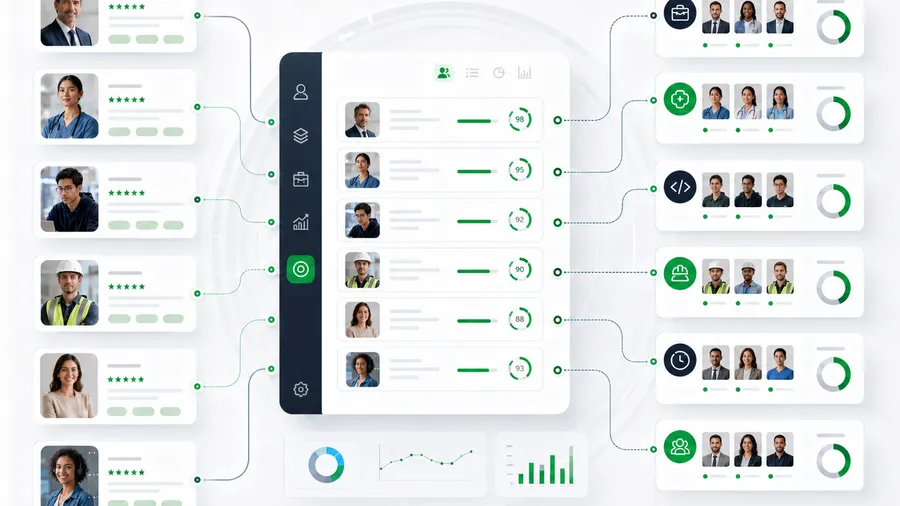
- A candidate portal — a branded page where applicants track their application status, upload documents and certifications, and complete onboarding without emailing anyone.
- A client portal — a branded page where hiring managers review submitted candidates, leave feedback, approve or reject, and request interviews.
- Placement and commission dashboards — real-time margin, fill rate, and payout math for your desk, not a report you rebuild in a spreadsheet.
- A custom ATS/CRM — pipeline stages, fields, and pay-and-bill logic modeled on your niche instead of everyone’s.
- Integrations and data pipelines — the glue that syncs candidates, job orders, and status between your job boards, your ATS, and GoHighLevel so nobody re-keys anything.
- Custom AI recruiter agents — voice or chat agents trained on your role families, pay ranges, and screening scripts that qualify candidates and draft submittals.
You don’t need all of it. Most agencies start with the two pieces that leak the most time and goodwill — the candidate portal and the client portal — and connect them to whatever they already run. The portals are the interface; your existing ATS, a custom one, or GoHighLevel stays the system of record underneath.
The candidate portal: self-service status, uploads, onboarding
Ask any San Diego recruiter what eats their afternoon and you’ll hear some version of “candidates asking where things stand.” The data backs up how badly that experience is broken: 53% of job seekers say they’ve been ghosted by a potential employer (iHire). Every one of those is a candidate you may need again next month — light-industrial and healthcare desks redeploy the same people constantly — and every silent gap erodes the relationship.
A candidate portal turns that silent gap into a self-service status page. The applicant logs in (from their phone — about 62% of applications are completed on mobile (Appcast)), sees exactly where they are in your pipeline, uploads their I-9 documents, certifications, and direct-deposit form, and completes onboarding steps on their own time. The recruiter stops being a status-lookup service and gets those hours back for actual placement work.
This is the same logic behind good candidate onboarding automation — the portal just gives it a front door the candidate can walk through themselves.
The client portal: what your hiring managers actually want
The client side is where a portal quietly wins you repeat business. B2B buying behavior has shifted hard toward self-service: 67% of B2B buyers now prefer a rep-free experience for at least part of a purchase (Gartner, 2026), Gartner earlier projected that 80% of B2B sales interactions would occur in digital channels by 2025 (Gartner Future of Sales), and Zendesk finds 67% of customers prefer self-service over talking to a representative (Zendesk).
Translate that to a San Diego hiring manager who needs three warehouse associates by Monday. They don’t want to wait for you to email a PDF of résumés, reply with feedback, and schedule a call to coordinate interviews. They want to open a link, see the candidates you submitted, thumbs-up two, and click “request interview.” A client portal gives them exactly that — and every action they take updates your system of record automatically, so your recruiter isn’t transcribing their feedback from an email.
The hidden tax of disconnected recruiting tools
Before you add another tool, it’s worth pricing what the current stack costs. When your job boards, ATS, calendar, and CRM don’t talk to each other, your team pays the difference in re-keyed data and context-switching.
The numbers are stark. In a 2024 SmartRecruiters survey of 533 talent professionals, 45% of TA leaders said they spend more than half their hours on administrative tasks that could be automated (SmartRecruiters, via Shortlistd). A Totaljobs study of 748 HR leaders put administrative work at 17.7 hours per vacancy (via Staffing Industry Analysts). It rhymes with what Salesforce sees on the sales side, where reps spend only about 30% of their time actually selling (Salesforce State of Sales) — and a recruiter is, functionally, a salesperson for candidates and job orders.
The switching itself has a cost: research from UC Irvine’s Gloria Mark found it takes about 23 minutes to refocus after an interruption or app-switch (UC Irvine). And the data that gets re-typed between silos degrades — Gartner estimates poor data quality costs organizations an average of $12.9 million a year (Gartner). For a staffing desk that means duplicate candidate records, stale statuses, and a placement that slips because two systems disagreed on where a candidate stood.
Custom portals and the integrations behind them attack this directly: a candidate updates their own record, a client’s feedback writes back automatically, and status flows between systems instead of through a recruiter’s keyboard. That’s the same disease diagnosed in the hidden cost of disconnected recruiting tools for Seattle agencies — portals are one of the cleanest cures.
Build vs. buy: when off-the-shelf is enough — and when it isn’t
Custom isn’t always the answer. A boxed ATS is the right call more often than vendors of custom software like to admit — so here’s the honest line.
Off-the-shelf platforms like Bullhorn, JobAdder, Crelate, Ceipal, and Loxo are mature, supported, and fast to switch on. Bullhorn publishes small-agency pricing around $99/user/month for Starter and $165/user/month for Core, with higher tiers quoted individually (Bullhorn). If your desk fits how one of those tools works, buy it — you’ll be running this week, and the U.S. staffing industry it’s built for is a roughly $189 billion market (Staffing Industry Analysts), so these platforms are heavily invested in.
Custom earns its keep when the boxed tool can’t model your reality. Use this table as a gut check:
| Situation | Off-the-shelf ATS | Custom software / portals |
|---|---|---|
| Standard pipeline, common niche | Best fit — buy the seat | Overkill |
| A branded candidate/client portal | Limited or add-on | Purpose-built |
| Your pay-and-bill or compliance logic is unusual | Awkward workarounds | Modeled exactly |
| Data trapped across several disconnected tools | Another silo to sync | The integration layer |
| Per-seat cost balloons as you add recruiters | Scales with headcount | You own it — no per-seat tax |
| You want to resell the system (white-label) | Not possible | Yes, it’s your product |
Notice it’s rarely all-or-nothing. Most agencies keep a system of record and add custom portals and integrations on top — the best of both. If you’re weighing GoHighLevel specifically as that back end, our GoHighLevel vs. Bullhorn comparison walks the trade in detail, and the GoHighLevel ATS pipeline guide shows how far the platform goes before you need custom code at all.
What custom portals cost and how to scope one
The honest answer: it’s quoted per project, because no two desks need the same thing. A single candidate portal wired to an existing system of record is a very different build from a full custom ATS with commission dashboards and AI screening. Smaller internal tools and integrations start lower; a full platform scales from there.
What a good scope looks like:
- System of record first. Decide what stays the source of truth — your current ATS, a new custom one, or GoHighLevel. Portals connect to it; they don’t replace it on day one.
- One portal, one workflow to start. Usually the candidate status/upload portal or the client review portal — whichever is bleeding the most time right now.
- Integrations that kill the re-keying. The connectors between job boards, your ATS, and GHL so a candidate or job order is entered once.
- A written, fixed quote. Milestones, deliverables, timeline, and a fixed price — not open-ended hourly drift.
Modern portals are typically built on a Next.js/React front end with a Postgres database, authentication, and Stripe if you’re billing through it, deployed on Vercel or Cloudflare — a stack that ships fast and runs reliably. The point of getting a real quote is to compare it against the ongoing cost you’re already paying: per-seat ATS fees plus the recruiter hours the current setup wastes every single month.
How to start without ripping everything out
You don’t migrate a working desk overnight, and you shouldn’t. The lowest-risk path is additive:
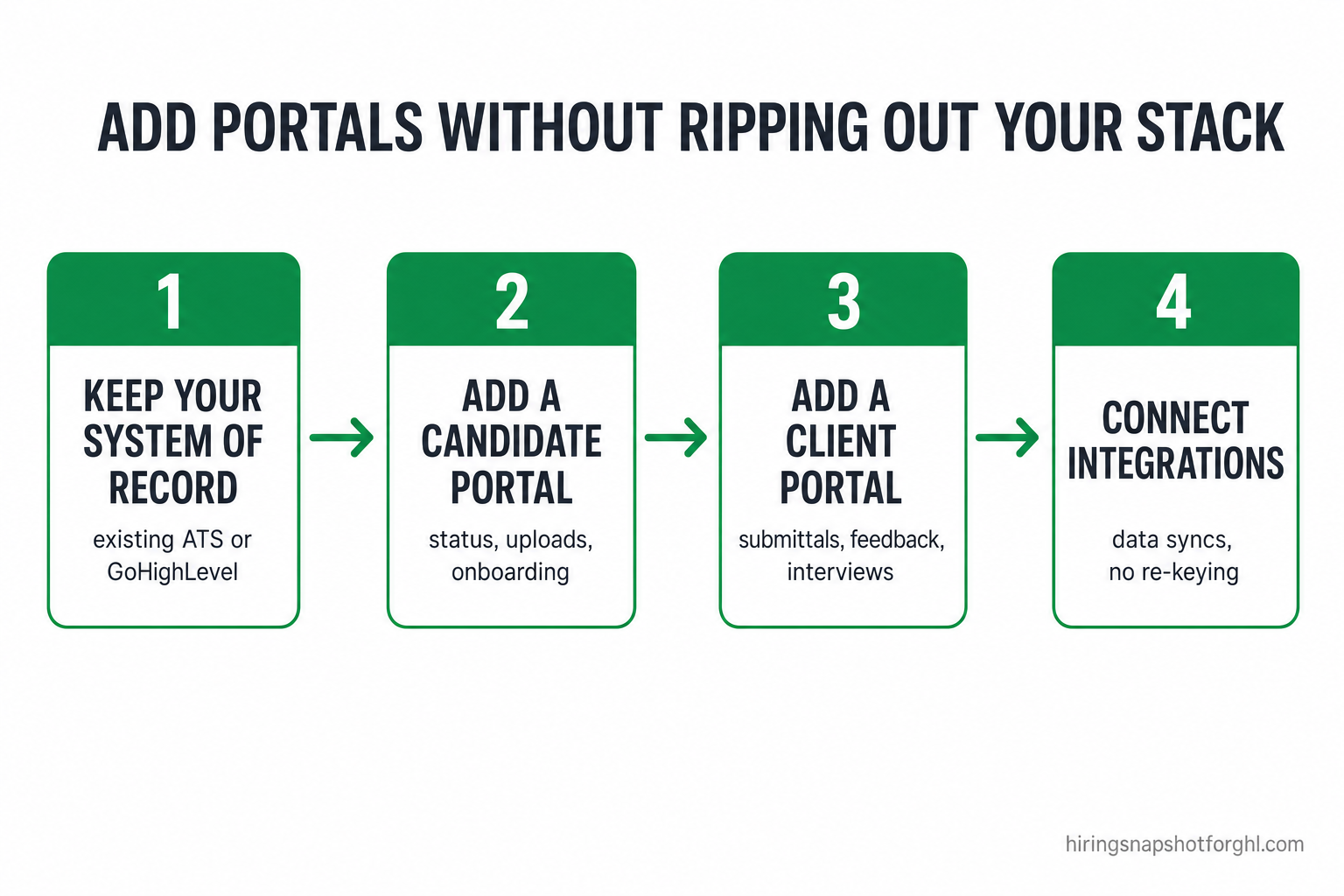
- Keep your system of record. Whatever runs your desk today stays in place — no big-bang migration, no downtime.
- Add the portal that leaks the most. If recruiters are buried in status questions, start with the candidate portal; if clients are the bottleneck, start with the client portal.
- Wire the integrations. Connect the portal back to your system of record so every self-service action writes back automatically.
- Measure, then expand. Once the first portal has clawed back recruiter hours, add the second, then dashboards and AI screening if the math supports it.
If you’d rather not run any of it yourself, a trained GoHighLevel VA can operate the back end while the portals handle the front — and if your bottleneck is time-to-fill rather than tooling, start with the time-to-fill playbook and the metrics in our 2026 staffing benchmarks before you build anything.
Frequently asked questions
Do I need to leave my current ATS to add a candidate or client portal?
No. A well-built portal connects to whatever you already use as a system of record — a custom ATS, an off-the-shelf platform like Bullhorn or Crelate, or GoHighLevel. The portal is the branded self-service interface; your existing tool stays the source of truth. That’s what makes it a low-risk, additive change rather than a migration.
What’s the difference between a candidate portal and a client portal?
A candidate portal faces your applicants: they track application status, upload documents and certifications, and complete onboarding themselves. A client portal faces your hiring managers: they review submitted candidates, leave feedback, approve or reject, and request interviews. Both write their activity back to your system of record so recruiters stop transcribing emails.
How much does custom recruiting software cost?
It’s quoted per project because scope varies enormously — a single portal wired to an existing ATS is far cheaper than a full custom ATS with dashboards and AI screening. For comparison, off-the-shelf ATS seats run about $99–$165 per user per month and up (Bullhorn). The way to a real number is a scoping call that produces a written, fixed quote and timeline.
Is custom software worth it for a small San Diego staffing agency?
It depends on where your time goes. If recruiters are spending more than half their hours on automatable admin — as 45% of TA leaders report (SmartRecruiters) — a portal that removes status lookups and re-keying often pays for itself in reclaimed placement hours. If your desk fits a boxed tool cleanly and your admin load is light, buy the seat instead.
Can portals connect to GoHighLevel?
Yes. GoHighLevel is a common system of record for staffing agencies, and portals connect to it directly so candidate and client actions flow into your GHL pipeline and automations. See our GoHighLevel ATS pipeline guide for how far GHL goes on its own before you add custom portals.
How long does a portal build take?
A focused single-portal build connected to an existing system of record is a matter of weeks, not months, because it isn’t rebuilding your whole stack — it’s adding one interface and its integrations. A full custom ATS with dashboards and AI agents takes longer. A proper scope gives you milestones and a fixed timeline up front so there are no surprises.
About the author
Marcus Delgado is the Staffing Agency Growth Lead behind the Hiring Snapshot, based in Tampa, FL. He ran a light-industrial staffing desk before joining the snapshot team, and he thinks in placement economics — fill rates, redeploys, gross margin per requisition. His posts lean on real desk math, not vanity metrics.
Related reading
- The Hidden Cost of Disconnected Recruiting Tools for Seattle Staffing Agencies
- How to Use GoHighLevel as an ATS: Build a Recruiting Pipeline That Fills Reqs Faster
- GoHighLevel vs Bullhorn for Staffing Agencies (2026): An Honest Comparison
- Candidate Onboarding Automation: Close the Offer-to-Start Gap
- How to Reduce Time-to-Fill: The GoHighLevel Playbook
Ready to give your San Diego recruiters their day back? Get a custom portal quote, book a scoping call, or see how the Hiring Snapshot works.