· Marcus Delgado · Field Reports · 19 min read
How to Collect Temp Timesheets Fast: The Weekly System That Shrinks Your DSO
Your invoice can't go out until the timesheet is in and the client has signed off. Those few days happen every week, before your net-30 clock even starts, and they quietly add a week to how long your money is tied up. Here is the six-stage system that gets hours in, gets them approved, and gets you invoiced the day the week ends, with the exact copy you can steal.
The short version: the slowest part of getting paid is not your invoicing software or your factoring line, it is the few days every week between the end of the work week and the moment a client manager actually approves the hours. Those days land before your net-30 clock even starts, so they hide inside your DSO where nobody tracks them. A desk that wants to get paid faster fixes the timesheet-to-approval cycle first: set the submission deadline and approval window in the contract, capture hours on a phone instead of paper, run an automated reminder cadence at the worker and the approver, clear disputes the same day, and push approved hours straight to invoicing. Do that and you invoice the day the week ends instead of the following Wednesday, pulling real days out of your cash cycle without touching your rates. This is the whole weekly system, with the exact messages to copy and the compliance rules you cannot skip.
Key takeaways
- DSO hides days before the clock starts. Staffing DSO runs a mean of about 45.1 days against a 30-to-39-day median, much of it the collection clock starting late, not clients paying slow (Staffing Industry Analysts).
- The expensive lag is human, not financial. Chasing workers for hours and managers for sign-off is where the days go. That chasing you can automate; the net term you cannot.
- Capture on a phone, not on paper. A text-link mobile submission beats a Friday fax and gives you the timestamped record you need anyway for FLSA recordkeeping.
- Put the deadline and approval window in the contract, with a “deemed approved” clause, so a silent manager cannot hold your invoice hostage.
- This is a capture-and-chase problem, not a payroll one. GoHighLevel and tools like it automate reminders and the approval request; they do not run payroll. Approved hours still flow to whatever back office cuts the checks.
Table of contents
- It is Monday and half your timesheets are still missing
- What slow timesheets actually cost you
- Where your DSO really hides
- The six-stage weekly timesheet system
- Stage 1: Put the rules in the contract
- Stage 2: Capture hours on a phone, kill the paper
- Stage 3: The worker reminder cadence
- Stage 4: The client approval chase
- Stage 5: Handle exceptions the same day
- Stage 6: Hand approved hours straight to invoicing
- Capture methods compared
- Three desks: solo, mid, and high-volume
- The compliance rules you cannot skip
- Common objections, answered
- FAQ
It is Monday and half your timesheets are still missing
It is 9:10am on a Monday. The work week ended Saturday, payroll runs Thursday, and your spreadsheet shows eleven of twenty-six temps have logged hours and the rest are blank. Two of your three client contacts have not approved anything. One is on vacation and nobody told you. You cannot invoice a single account until the hours are in and signed off, so Monday becomes a phone-and-text marathon chasing numbers people already know.
Here is the answer before the week eats you. Your money is slow almost never because of the client’s accounts-payable department. It is the three or four days at the front of every cycle spent collecting hours and getting them approved, and those days are invisible because they happen before your invoice exists. Fix that front end and you shave a week off how long your cash is tied up, with the same clients and the same terms.
What slow timesheets actually cost you
Temporary and contract staffing is a weekly-payroll business running on monthly-paying clients. In an average week in 2024, staffing companies employed about 2.2 million temporary and contract workers (American Staffing Association). Every assignment turns into a timesheet that has to be collected, approved, and billed before you see a dollar, after you have already paid the worker.
That gap is days sales outstanding, or DSO, the average days between doing the work and getting paid. Staffing Industry Analysts, citing a recent SIA Pulse Report, puts staffing DSO at a mean of about 45.1 days against a 30-to-39-day median, and makes the point that matters most here: a large share of it comes from the collection clock starting late, not clients being slow once the invoice lands (Staffing Industry Analysts).
Put a dollar figure on it. Payroll you are floating is roughly weekly payroll times DSO divided by seven, so a desk at $40,000 in weekly gross payroll and a 45-day DSO is floating about $257,000 before any comes back. At scale a net-30 firm floats four to five weeks of payroll, stretching to ten or eleven once DSO drifts into the 70-to-80-day range (Advance Partners). Every day you cut off the front of the cycle is a day less you float, and unlike the net term, those days are yours to fix. For the full cash-to-cash picture, including when factoring is worth its fee, read the companion guide on covering payroll when clients pay net-60.
Where your DSO really hides
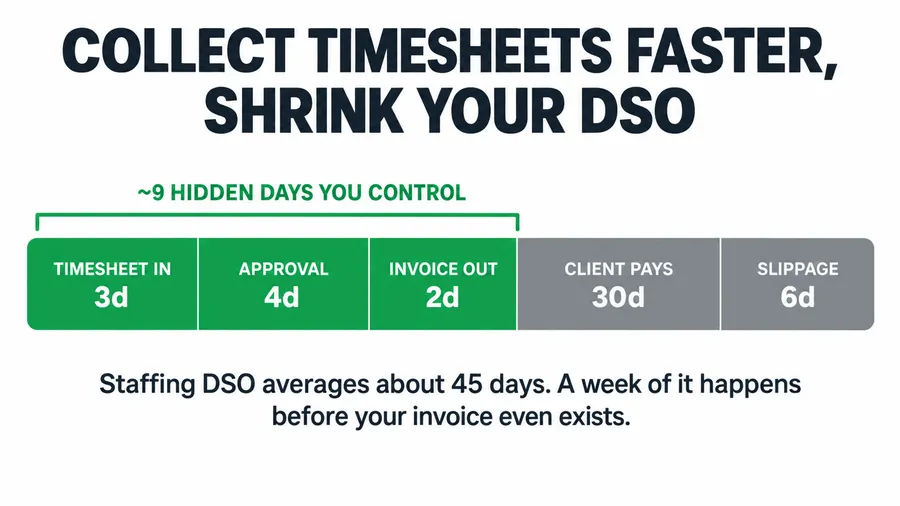
Take a typical net-30 account that still ends up at a 45-day DSO and break the 45 days into what actually happens. It looks like this.
The two gray bars on the right, the net term and the slippage past it, are what everybody obsesses over, and they are mostly out of your hands. The three green bars on the left, roughly nine days, happen before your invoice exists, so nobody reports them because there is no invoice to age yet. That is the hidden week, and it is the one you can take back.
The six-stage weekly timesheet system
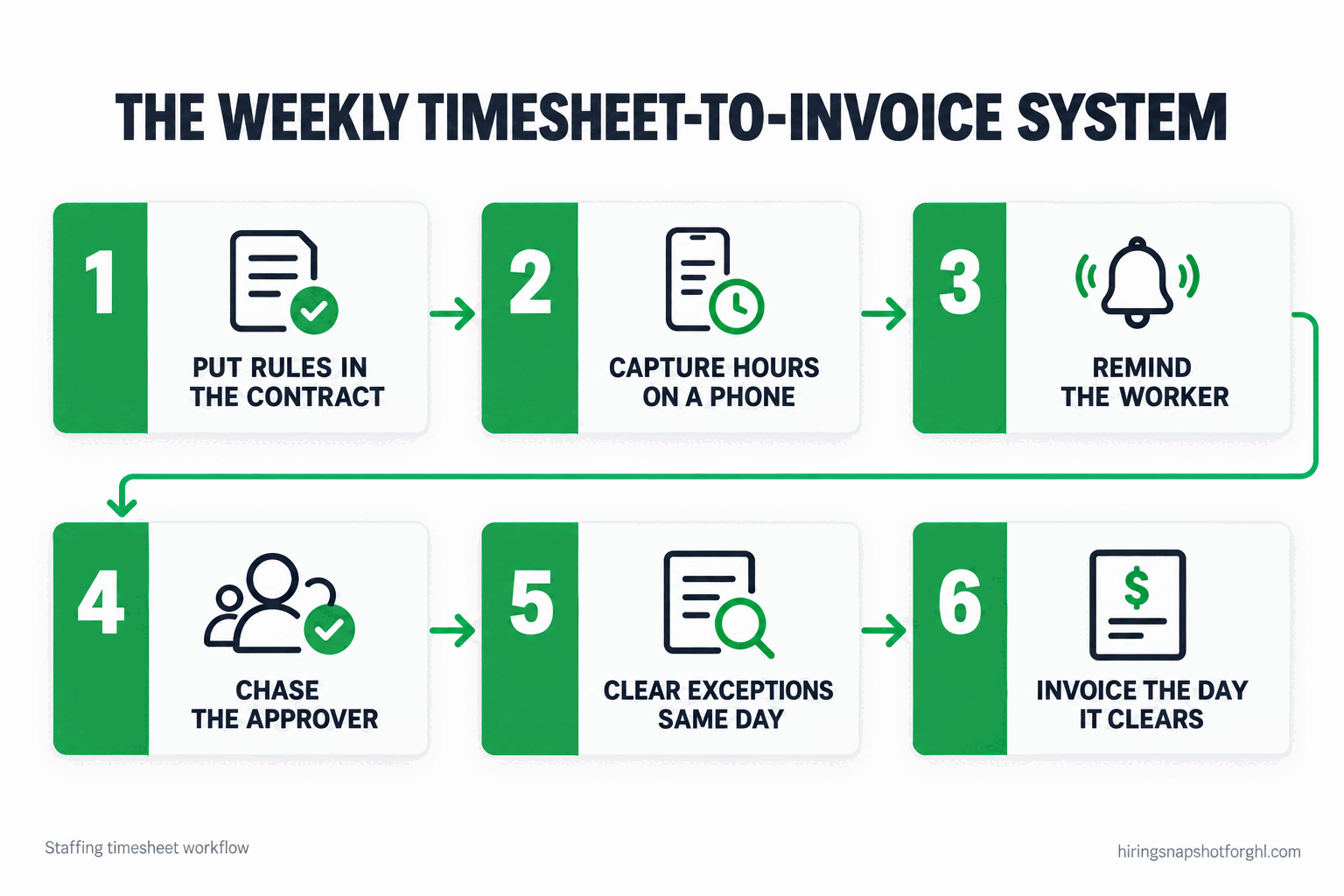
It is one loop that repeats every pay period: set the rules, capture the hours, chase the worker, chase the approver, clear the exceptions, hand off to billing. Six stages, each with a job and a way it breaks.
Stage 1: Put the rules in the contract
Timesheets are a weekly fight because nobody agreed to the rules up front. The client thinks they have until “whenever” to approve; the worker thinks submitting hours is optional until payday. Fix that in the service agreement, not in a text at 8am Monday.
Three clauses do the work. A submission deadline: hours are due by a set time, say noon the Monday after the work week ends. An approval window: the client has until, say, end of day Monday to approve or dispute. And the one that saves you, a deemed-approved clause: if the client does not dispute within the window, the hours are treated as approved and billable. A silent manager should never be able to freeze your invoice.
How it breaks: you put the clauses in but never enforce them, so they become decoration. The first time a client blows the window, invoice on deemed-approved and send a polite note pointing at the clause they signed. Enforce it once and the behavior changes. Set the same expectation up front when you qualify the job order before you work it.
Stage 2: Capture hours on a phone, kill the paper
Paper timesheets and emailed spreadsheets are where days disappear. A worker finishes a shift Saturday, means to send the sheet, forgets, and you find out Monday. The fix is to let people log hours from the phone in their pocket the day they work, not the week they get paid.
The practical options, in order of least friction: a mobile form the worker opens from a text link and fills in at end of shift; a photo of a signed paper sheet sent by text, which you key in; or, for clients who insist, logging inside their own vendor management system. Whatever the method, you want a timestamped submission you can store, because you need that record anyway. The Fair Labor Standards Act requires you to keep hours worked each day and total hours each workweek for every nonexempt employee, and time cards must be retained for two years (U.S. Department of Labor). A phone capture that writes to your system handles the recordkeeping and kills the paper in one move.
How it breaks: you offer a slick mobile form but a third of your crew ignores it, so you are back to chasing. Meet them where they already are, which is text messaging. Do not make them download an app or remember a password. A text link that opens a prefilled form is the highest-response path for an hourly workforce, the same reason SMS-first recruiting outperforms email here.
Stage 3: The worker reminder cadence
Getting hours in on time is a reminder problem, and reminders are what automation does best. For a Saturday week-end and a Monday-noon deadline, the cadence that works looks like this, sent by text because that is what gets read.
Friday, end of day (heads-up): “Hi [FirstName], [AgencyName] here. Your hours for this week are due by Monday 12pm. Log them anytime here: [link]. Reply STOP to opt out.”
Monday, 8:00am (the nudge): “Morning [FirstName] - quick reminder your timesheet is due by 12pm today so we can get you paid on time. Takes 30 seconds: [link]”
Monday, 11:00am (last call, only to those still missing): “[FirstName], we still need your hours for last week to run payroll Thursday. Please log them in the next hour: [link]. Stuck? Reply here and we’ll help.”
Two details make this cadence work. The link is personalized and prefilled, so it is 30 seconds, not a chore. And the messages go only to workers who have not yet submitted, which an automated workflow handles by checking status before it sends. Blasting a reminder at people who already submitted is the fastest way to get opted out of. And while texting workers about their pay is a business relationship, you still need consent on file and a working opt-out, covered in TCPA compliance for recruiting texts.
How it breaks: there is no escalation for the worker who ignores all three. Build a final branch that pings the recruiter who owns that assignment, so a human calls before the deadline. Automation collects the 90 percent; a person closes the last 10.
Stage 4: The client approval chase
This stage costs the most and gets the least attention. Your worker can submit hours Saturday night and your invoice still cannot go out until the client’s on-site manager signs off, and that manager is busy running a warehouse, not waiting to approve your timesheet. The chase is the worker cadence aimed at a different person.
Monday, 12:30pm (right after the submission deadline): “Hi [ContactName], the timesheets for [AgencyName]‘s crew at [Site] for week ending [Date] are ready for your approval: [approval link]. Per our agreement they’re due back by end of day today. Takes two minutes.”
Monday, 4:00pm (if not yet approved): “Quick follow-up, [ContactName] - still need your sign-off on this week’s hours so we can invoice. Anything look off, reply here and I’ll fix it today: [approval link]”
Tuesday, 9:00am (deemed-approved notice, if still silent): “[ContactName], we haven’t heard back on week ending [Date], so per our agreement those hours are approved as submitted and we’ll invoice today. If there’s a dispute, let me know right away and we’ll reconcile.”
Give the approver a one-tap path: a link that shows the week’s hours with an “approve all” and a “dispute a line” button beats asking for a signed PDF. The lower-friction the yes, the faster your invoice goes out. The deemed-approved message is not a threat, it is the clause they agreed to, stated plainly, and used consistently it trains even your slowest client to approve inside the window rather than let the number default.
How it breaks: the approver who always disputes after the deadline to buy time. Handle that at the account level, not the message level. If a client repeatedly games the window, tighten their terms or reprice the account, the same muscle you use when a client pushes on rate.
Stage 5: Handle exceptions the same day
Most weeks a handful of timesheets will not be clean. Someone logged 44 hours and the client says 40. Overtime was worked without a heads-up. A worker forgot to clock out and shows a 14-hour shift. If these sit in a pile until Wednesday, they hold up the whole batch and Thursday payroll gets tense.
Separate the clean from the messy immediately. Approved, undisputed hours go straight to billing the moment the window closes. Disputed or flagged lines go into a same-day exception queue that a human works. Never let one bad line hold five good accounts hostage. When you reconcile, the timestamped records from Stage 2 settle it fast, and a calm message keeps it friendly:
“Hi [ContactName], thanks for the flag on [WorkerName]‘s hours. Our record shows [X] hours across [days], submitted [timestamp]. Can you confirm the hours you have so we can line them up? Happy to adjust if we missed something.”
How it breaks: you fix the dispute but never fix the cause. If the same site disputes every week, the capture method there is wrong, often a clock-in process that does not match how you record time. Fix the capture, not just the invoice, or you reconcile the same fight forever.
Stage 6: Hand approved hours straight to invoicing
By Monday evening you have a clean set of approved hours, so the invoice can go out that day instead of mid-week. Be clear about what does what, because operators get this wrong. The capture-and-chase layer you just built is not a payroll or billing engine. GoHighLevel and tools like it are good at forms, reminders, approval requests, and moving a record from submitted to approved on a schedule; they do not calculate payroll taxes or cut checks. Approved hours flow into whatever back office you already run, your pay-and-bill platform or your bookkeeper, which turns them into a paycheck and an invoice. Expecting a front-office automation to run payroll is how people end up disappointed. For how the capture layer sits in front of an applicant tracking system, see using GoHighLevel as an ATS.
Then invoice the same day the hours clear. The single highest-impact habit in the cycle is to stop batching invoices into a weekly run and bill each account the moment its hours are approved. An invoice issued Monday at net-30 is paid a week sooner than the same invoice issued the following Monday, for zero extra cost.
How it breaks: the handoff is manual, so approved hours sit waiting for someone to retype them into the billing system. Every re-keying is a delay and an error source. Map the fields once so an approved timesheet syncs to billing without a human transcribing numbers between two screens.
Capture methods compared
Not every method fits every desk. Here is the honest trade-off across the four ways agencies collect hours.
| Method | Speed | Worker friction | Record quality | Best for |
|---|---|---|---|---|
| Paper or faxed sheet | Slow | Low | Poor, manual entry | Legacy sites that refuse to change |
| Emailed spreadsheet | Slow | Medium | Fair, easy to fudge | Salaried or small contract desks |
| Mobile form by text link | Fast | Low | Strong, timestamped | Light-industrial and hourly crews |
| Client’s own VMS | Varies | None for you | Strong but siloed | Large accounts that mandate it |
Most small and mid-size light-industrial desks should standardize on the mobile-form-by-text row: it matches how an hourly workforce behaves and produces the timestamped compliance record. Reserve client-VMS for accounts big enough to dictate terms, and treat paper as a migration target.
Three desks: solo, mid, and high-volume
The right amount of system depends on how many timesheets you move each week.
The solo contingency recruiter, mostly perm. Placing direct-hire candidates for a one-time fee, you barely have a timesheet problem, you have an invoice-on-start-date problem. Your version is tiny: one automated reminder to invoice the day a placement starts, plus payment terms and a late fee in your fee agreement. Do not buy timesheet tooling you will use twice a quarter. Your cash problem is slow-paying clients on placement invoices, a terms-and-collections issue, not a capture one.
The mid-size light-industrial desk, 40 to 80 temps a week. This is where the full six-stage system pays off fastest. You have enough volume that manual chasing eats a recruiter’s whole Monday, and few enough accounts to enforce terms client by client. Automate the worker cadence and approval chase, keep a human on exceptions, invoice per account as hours clear. This desk typically finds three to five days of DSO hiding in its front end, the difference between making payroll comfortably and sweating Thursday.
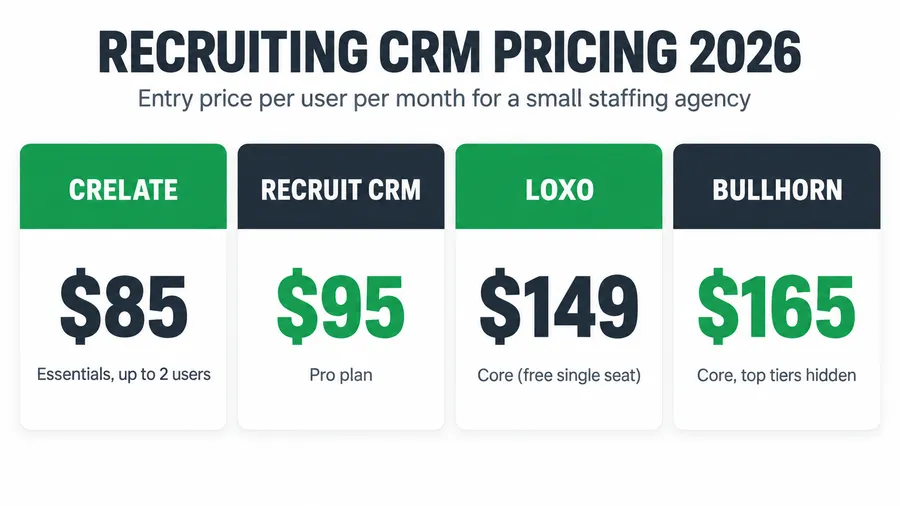
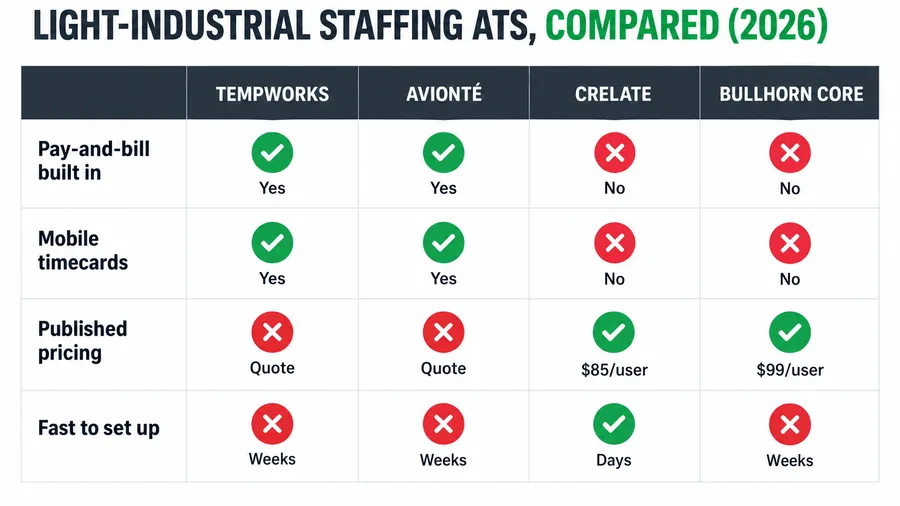
The high-volume desk, 300-plus temps across many sites. At this scale you have likely outgrown a pure capture-and-chase layer and need a real pay-and-bill back office, the kind you would evaluate in a staffing ATS pricing comparison. The automation layer still earns its place in front, running the reminder and approval cadences that heavy back-office tools handle clumsily and feeding clean hours into them. The mistake here is assuming the expensive platform solves the human chasing. It rarely does; the nagging is still a workflow you design.
The compliance rules you cannot skip
Speeding up timesheets never means loosening the record. Three rules are non-negotiable, and a well-built capture honors all of them.
Keep the required records. Under the FLSA you must record hours worked each day and total hours each workweek for every nonexempt employee, with pay rate and wages, and retain payroll records three years and the underlying time cards two (U.S. Department of Labor). A timestamped mobile submission covers this without a filing cabinet.
Round time only if it is neutral. Federal rules let you round punches to the nearest 5 minutes, tenth of an hour, or quarter hour under 29 CFR 785.48, but only if the rounding is neutral and pays workers for all hours actually worked over time (eCFR, 29 CFR 785.48). A system that always rounds down is a wage claim waiting to happen, and some states are stricter, so confirm yours.
Pay overtime on actual hours. Nonexempt workers get time-and-a-half over 40 hours in a workweek, and some states add daily overtime. Your capture has to surface overtime as it happens, not discover it Thursday, another reason real-time logging beats a Monday paper dump. As the staffing agency you are usually the employer of record, so these obligations are yours, not the client’s, the same logic behind running a proper background-check and onboarding checklist before anyone starts.
Common objections, answered
“My clients use their own timesheet system, so this doesn’t apply.” Then the approval stage is handled for those accounts, so skip it for them. But you almost never have every account on a client VMS, and the ones that are not are where your days leak. Run the system for the accounts you control and let the VMS accounts ride.
“I mostly do perm placement. Timesheets aren’t my problem.” Correct, and the solo scenario above is written for you. Your version is one invoice-on-start reminder and a payment-terms clause. Do not build a temp timesheet machine for a perm desk. Your cash problem lives in collections, not capture.
“Won’t workers get annoyed by the reminder texts?” Only if you spam them. The cadence sends at most three messages, only to people who have not submitted, every one about getting them paid on time, which is a message people want. Stop messaging the moment they submit, honor every opt-out, and the annoyance never shows up.
“Isn’t this just what my ATS or payroll tool already does?” Rarely the chasing part. Most platforms can store an approved timesheet and bill from it, but the reminding and approval-requesting that actually collects the hours is usually left to a human with a phone. The automation layer fills that gap and feeds the result into the tool you already have.
FAQ
How do I get temp workers to submit timesheets on time?
Make it a 30-second task on their phone and remind them on a schedule. Send a prefilled mobile form link by text, with a heads-up the day the week ends and one or two reminders before the deadline, only to workers who have not yet submitted, then escalate the stragglers to a recruiter. Texting beats email and app downloads for an hourly workforce because it meets people where they already are.
What is a deemed-approved clause and should I use one?
It is a line in your service agreement stating that if the client does not approve or dispute submitted hours within a set window, the hours are treated as approved and billable. Yes, use one. It stops a busy or absent client manager from freezing your invoice, and used consistently it trains clients to approve inside the window.
How does fixing timesheets lower my DSO?
DSO includes the days between the work being done and the invoice going out, not just the days a client takes to pay. Staffing DSO averages about 45 days, and a chunk of that is the collection clock starting late (Staffing Industry Analysts). Getting hours in and approved faster, then invoicing the same day, pulls those front-end days out of your cash cycle without changing anyone’s terms.
Can GoHighLevel run my staffing payroll?
No. GoHighLevel and similar tools automate capture, reminders, and approval requests, and move a record from submitted to approved. They do not calculate payroll taxes or cut checks. The approved hours flow into your existing pay-and-bill back office, which handles the actual payroll and invoicing.
What timesheet records am I legally required to keep?
Under the FLSA you must keep hours worked each day and total hours each workweek for every nonexempt employee, plus pay rate and wages paid, and retain payroll records three years and time cards two (U.S. Department of Labor). A timestamped electronic capture satisfies this.
About the author
Marcus Delgado is the Staffing Agency Growth Lead behind the Hiring Snapshot. He ran a light-industrial staffing desk before joining the team to focus on agency growth, and he thinks in placement economics: fill rates, redeploys, and gross margin per requisition. His posts lean on real desk math, not vanity metrics.
Related reading
- Staffing Agency Cash Flow: How to Cover Payroll When Clients Pay Net-60
- Staffing Agency Bill Rate & Markup: How to Price So You Actually Keep Margin
- No-Call No-Show in Staffing: The Attendance System That Keeps Shifts Filled
- TCPA Compliance for Recruiting Texts: Consent, Opt-Outs, and the Rules That Bite
- How to Use GoHighLevel as an ATS for Your Recruiting Pipeline
Stop spending Monday chasing hours by hand. See how the Hiring Snapshot works, then get the full build for a one-time $997, installed within one business day and flat no matter how many temps you run.