· Neha Chandra · Playbooks · 20 min read
The Staffing Agency Background Check Checklist: FCRA, I-9 and E-Verify Without a Lawsuit
A plain-English compliance checklist for staffing agencies running background checks: the exact FCRA disclosure and adverse-action steps, the I-9 timing rule that is different for staffing, when E-Verify is mandatory, and copy-and-paste candidate notices.
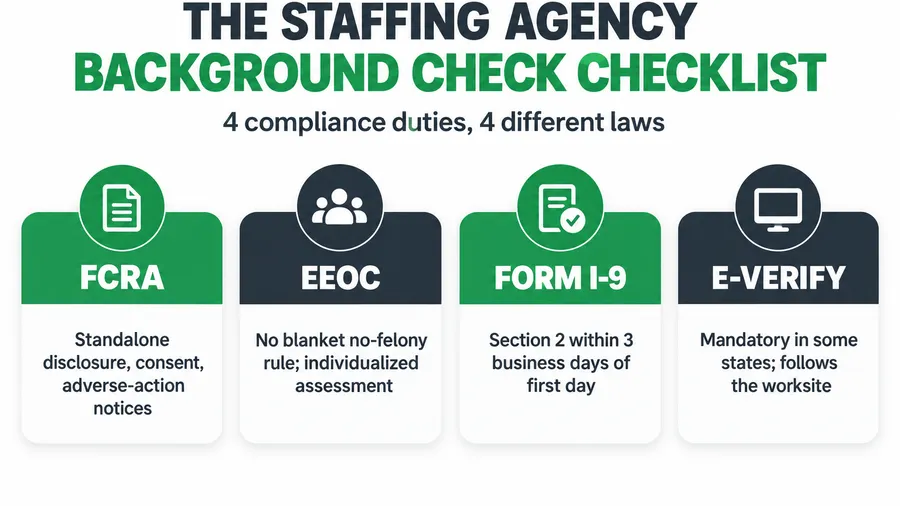
A staffing agency running background checks has four separate compliance duties, and they do not come from the same law. The FCRA governs how you ask for consent and how you tell a candidate they were turned down. The EEOC governs how you weigh a criminal record. Form I-9 governs work authorization and has a three-business-day clock that counts differently for staffing agencies than for anyone else. E-Verify is mandatory in some states and optional in others. Miss the FCRA steps and you are looking at a class action; employers have paid out about $174 million settling background-check suits over the last decade (HR Dive). This is the operator’s checklist: every step, in order, with the exact candidate notices you can copy, the failure modes that actually get agencies sued, and where the rules change by state.
Key takeaways
- The FCRA disclosure must stand alone. A consent form buried inside your application is the single most-sued mistake. 7-Eleven paid $1,972,500 to about 50,000 applicants over exactly this (backgroundchecks.com).
- Adverse action is two notices, not one. Before you reject on a report you send a pre-adverse notice with a copy of the report; after a wait you send the adverse-action notice. Skipping the pre-adverse step is the second-most-common suit.
- The I-9 clock is different for staffing. You can treat the first day of an assignment, or the day a worker enters your assignment pool, as the first day of employment (USCIS). Section 2 is still due within 3 business days of that date.
- E-Verify is state law, not federal choice. It is mandatory for all private employers in Alabama, Arizona, Mississippi and South Carolina, and for Florida employers with 25 or more staff (Paylocity).
- A criminal record is not an automatic no. The EEOC expects an individualized assessment weighing the offense, the time passed, and the job (EEOC).
Table of contents
- What getting this wrong actually costs
- The four-part compliance stack
- Part 1: The FCRA, step by step
- Part 2: The EEOC rule on criminal records
- Part 3: Form I-9, and the staffing exception
- Part 4: E-Verify, and whether your state forces it
- Steal these candidate notices
- How the checklist changes by agency size
- Common objections, answered
- FAQ
What getting this wrong actually costs
Start with the number, because it reframes the whole exercise. HR Dive reported that employers paid roughly $174 million over a decade to settle background-check lawsuits (HR Dive). These are not fraud cases. They are paperwork cases. The money went out the door because a consent form had an extra paragraph in it, or because a candidate got rejected without the notice the law requires first. 7-Eleven paid $1,972,500 to about 50,000 applicants over a disclosure that bundled in extra language instead of standing alone (backgroundchecks.com); the chart below shows the rest.
Staffing agencies sit right in the blast radius because you run more background checks than almost any other employer. There are roughly 27,000 staffing and recruiting companies in the United States placing around 2.2 million temporary and contract workers in an average week (American Staffing Association). Volume multiplies a per-candidate paperwork error into a class the size of your whole applicant pool. Get the form wrong once and you got it wrong for everyone.
The four-part compliance stack
Background screening feels like one task. It is four, each from a different authority, and you have to satisfy all of them for every placement:
- The FCRA. A federal law run by the FTC and CFPB. It controls consent and the rejection process any time you use a third-party background check company. This is the one that gets agencies sued.
- EEOC guidance. Title VII, enforced by the EEOC. It controls how you are allowed to use a criminal record once you have it, so a blanket “no felonies” rule is a legal risk.
- Form I-9. Run by USCIS and ICE. Every new hire, no exceptions, confirms identity and work authorization. Staffing agencies get a special timing rule here.
- E-Verify. A federal system that some states make mandatory. Whether you must use it depends entirely on where your workers are.
Work them in that order for each candidate and nothing slips. Here is each one in full.
Part 1: The FCRA, step by step
The Fair Credit Reporting Act applies the moment you order a background report from a third party, which the law calls a “consumer reporting agency.” Checkr, Sterling, HireRight, a county court runner, all of them count. The FCRA has four steps and the order is not optional.
Step 1: The standalone disclosure
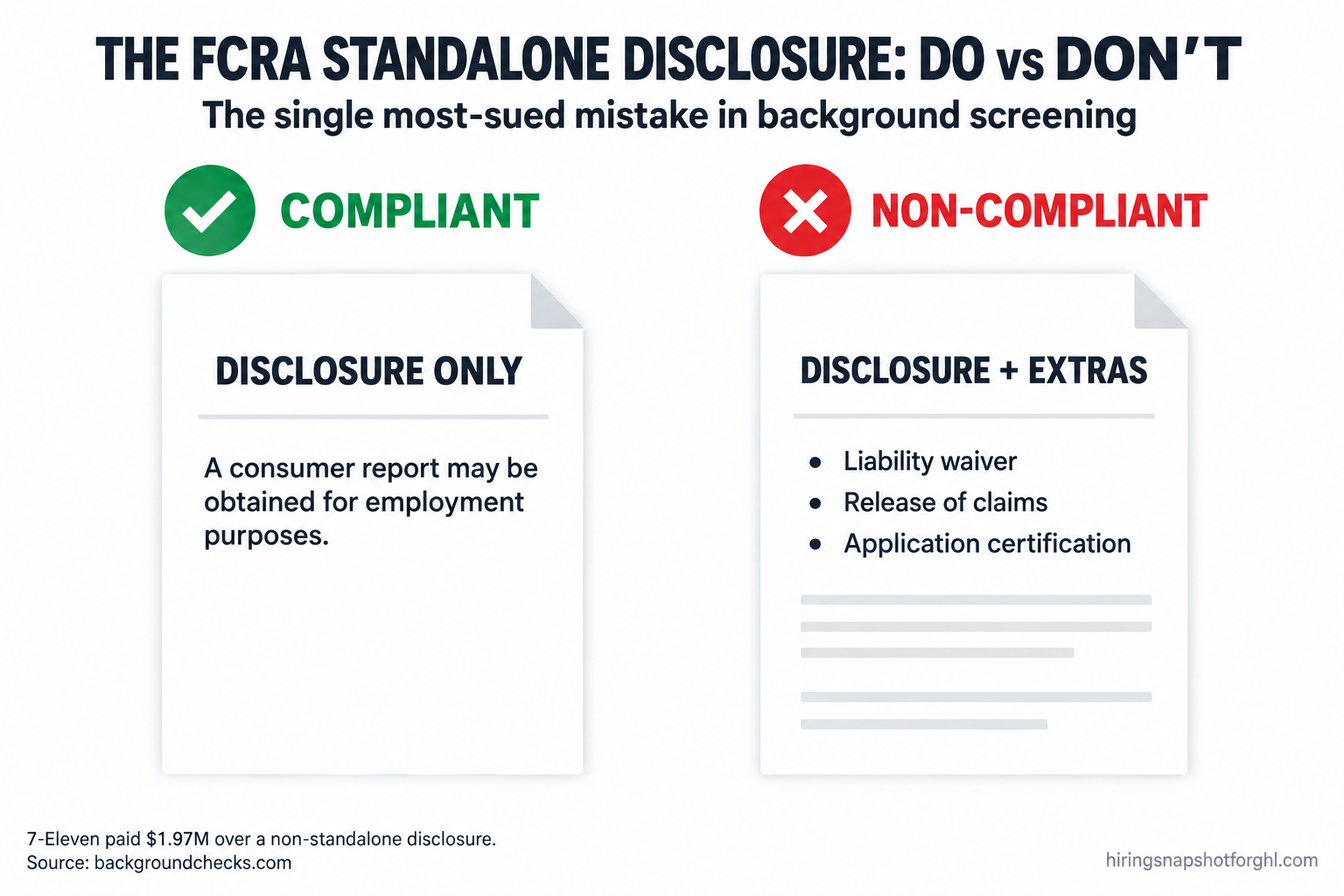
Before you order anything, you give the candidate a written notice that you may obtain a consumer report for employment purposes. The word that gets people sued is standalone. The FTC says this disclosure must be “in a document that consists solely of the disclosure” (FTC). Not a paragraph in your application. Not a line in the offer letter. Its own page, with nothing else on it.
What kills the standalone status: a liability waiver, a release of claims, state-law notices crammed onto the same page, or a line certifying the application is accurate. Every one of those extras has anchored a class action. The 7-Eleven case turned on exactly this (backgroundchecks.com). Keep the page to one job: telling the candidate a report may be run.
Step 2: The written authorization
You need the candidate’s written permission before ordering. This can sit on the same page as the disclosure, which is the one thing the FCRA lets you combine. Get it signed, date-stamp it, and store it. For staffing agencies running SMS-first intake, an e-signature or a texted consent link is fine as long as the candidate actively agrees and you keep the record.
Step 3: Pre-adverse action, before you say no
This is the step agencies forget, and it is the second-most-sued mistake after the disclosure. If something in the report might make you reject the candidate, you cannot just reject them. First you send a pre-adverse action notice, and it must include a copy of the background report and the CFPB’s document “A Summary of Your Rights Under the Fair Credit Reporting Act” (CFPB). The point is to let the candidate see the report and dispute anything wrong in it before you make the call final. Background reports carry errors more often than people assume, and a wrong report is the candidate’s to correct, not yours to act on blindly.
Step 4: Wait, then send the adverse-action notice
The FCRA sets no exact waiting period, but the FTC treats roughly five business days as a reasonable gap between the pre-adverse notice and the final decision (FTC). After that, if you are still rejecting, you send the adverse-action notice. It must give the name, address, and phone number of the background check company, a statement that the company did not make the decision and cannot explain it, the candidate’s right to dispute the report’s accuracy, and their right to a free copy within 60 days.
How this breaks. The most common failure is treating rejection as one email. You run the report, see a flag, and tell the candidate no. That collapses four steps into one, skips the pre-adverse notice entirely, and is a textbook FCRA violation. The second failure is a pre-adverse notice with no report attached, which defeats the entire purpose. The third is the five-day wait that never happens because a recruiter wants to move fast. Build the gap into your workflow so it is automatic, not a judgment call under pressure.
Part 2: The EEOC rule on criminal records
A clean FCRA process tells you how to handle the report. It does not tell you whether you are allowed to reject someone over what the report shows. That is the EEOC’s territory, and it is where blanket policies get agencies in trouble.
The EEOC’s 2012 enforcement guidance treats a flat “we don’t hire anyone with a conviction” rule as a Title VII risk, because criminal records fall unevenly across racial and national-origin lines, which creates disparate impact (EEOC). Two practical rules come out of it.
First, an arrest is not a conviction. An arrest alone does not establish that someone did anything, so you cannot reject on an arrest record by itself. Second, when a conviction is relevant, the EEOC expects a targeted screen weighing three factors: the nature and gravity of the offense, the time that has passed since it, and the nature of the job the person is up for. A ten-year-old misdemeanor has little bearing on a warehouse assignment. A recent embezzlement conviction is squarely relevant to a bookkeeping placement.
On top of that, the EEOC recommends an individualized assessment: tell the candidate they are being screened out because of a record, let them explain (the record could be wrong, or there could be rehabilitation since), and weigh what they say before you finalize. It is a short conversation and a note in the file, and it is the difference between a defensible decision and a disparate-impact claim.
This stacks on top of state and local “ban the box” laws, which often bar you from asking about convictions until later in hiring. The compliance mindset here is the same one behind the newer rules on automated screening tools, covered in the AI hiring laws every staffing agency should know in 2026.
Part 3: Form I-9, and the staffing exception
Every new hire in the United States completes a Form I-9 to confirm identity and work authorization. No exceptions, no “they’re only temp.” And the form itself has a version that matters: as of 2026 the current edition is dated 01/20/2025 and is valid through 05/31/2027. The older 08/01/2023 edition that expired 07/31/2026 is no longer usable, so if your intake still serves the expired form you are out of compliance before a worker signs a thing (McGuireWoods). The edition date is in the lower-left corner; check it.
The timing has two deadlines. The employee completes Section 1 no later than their first day of work. The employer completes Section 2 within three business days of that first day, reviewing the original documents in person (USCIS). The clock excludes the start day itself: start Monday, and Section 2 is due by Thursday.
The part that is genuinely different for staffing
Here is the staffing-specific rule most agencies never learn. USCIS lets a staffing agency choose what counts as the “first day of employment” for the I-9 clock: either the date a worker is actually assigned to their first job, or the date the worker enters your assignment pool (USCIS). That choice matters. If you I-9 everyone at pool entry, you front-load the paperwork and never scramble to complete Section 2 inside three days when a client needs a worker on-site tomorrow. If you wait until assignment, you avoid doing I-9s for candidates who never get placed, but you take on the risk of a tight three-day window on urgent orders. Pick one policy, write it down, and apply it to every worker the same way.
How this breaks. The classic staffing failure is the rush placement: a client calls Friday needing ten workers Monday, you place them, and Section 2 slips past the three-day deadline in the chaos. The fix is the pool-entry policy above, so authorization is already verified before the urgent call comes. The second failure is late reverification for workers whose authorization has an expiration date. Onboarding automation that triggers these steps on a timer, not a recruiter’s memory, is exactly what I walked through in candidate onboarding automation for staffing.
Part 4: E-Verify, and whether your state forces it
E-Verify is the federal system that checks the I-9 information against government records. Federally it is voluntary. By state law it is often not, and this is purely a question of geography, which makes it a live issue for staffing agencies placing across state lines.
As of 2026, E-Verify is mandatory for all private employers in Alabama, Arizona, Mississippi, and South Carolina. Florida requires it for private employers with 25 or more employees under statute 448.095, within three business days of hire (Paylocity). Georgia’s threshold is around 10 employees. A set of other states, including Tennessee, Utah, North Carolina, and Louisiana, require it above various headcount lines, and many more require it only for public employers and government contractors (Lattice).
The ground is moving. Florida’s legislature has debated removing the 25-employee threshold so every private employer must use it, and Indiana’s new FAIRNESS Act expands its mandate in 2026 (Jimerson Birr). Because the rules shift and conflict between trackers, confirm your specific states against the statute before you set policy. In a mandate state, E-Verify within three business days is not optional, and the penalty in a state like Florida can reach suspension of your business licenses.
How this breaks. The multi-state agency runs E-Verify inconsistently, using it in the state where the office sits but not in the mandate state where a client’s worksite is. E-Verify follows the worksite, not your headquarters. The second failure is mishandling a Tentative Nonconfirmation: when E-Verify flags a mismatch, the worker has a right to contest it and you cannot fire or refuse to place them while the case is open. Treating a mismatch as an automatic no is its own violation.
Steal these candidate notices
The templates below cover the three FCRA notices and the candidate-facing messages around them. Treat these as plain-English starting points for your lawyer to approve, not as legal advice, because state add-ons vary. But the shape is correct, and it is the shape that keeps you out of the 7-Eleven column.
1. The standalone disclosure (its own page, nothing else on it)
“DISCLOSURE REGARDING BACKGROUND INVESTIGATION. [Agency name] may obtain a consumer report about you for employment purposes, including to decide whether to place you on an assignment. A consumer report may include information about your character, general reputation, criminal history, and work history. This disclosure is provided to you in a document that contains only this disclosure.”
2. The written authorization (may sit under the disclosure)
“AUTHORIZATION. I have read the Disclosure above and I authorize [Agency name] to obtain a consumer report about me for employment purposes, now and, where permitted, throughout my assignment history with the agency. Signature: __________ Date: __________”
3. The pre-adverse action notice (sent with the report + Summary of Rights attached)
“We are writing before making a final decision about your placement. Enclosed is a copy of the background report we received and a document called ‘A Summary of Your Rights Under the Fair Credit Reporting Act.’ Please review the report. If you believe anything in it is inaccurate or incomplete, contact [background check company] at [phone] to dispute it. We will not make a final decision for at least five business days so you have time to respond.”
4. The adverse-action notice (after the wait, if still rejecting)
“After reviewing the information available to us, we are unable to place you on an assignment at this time. This decision was based in part on a report from [background check company name, address, phone]. That company did not make this decision and cannot explain why it was made. You have the right to dispute the accuracy of the report directly with them, and the right to a free copy of your report from them within 60 days.”
5. The candidate-facing SMS (keeps the human in the loop)
“Hi [first name], we’ve sent an important update about your application to your email, including a document you’ll want to review. Please check your inbox and reply here if you have any questions.”
Two notes. Attach the actual report and the Summary of Rights to notice 3; a pre-adverse notice without them does not count. And do not let the SMS be the adverse-action notice, because the full disclosures have to be in writing with the specific contents above. The text is there to make sure the candidate actually opens the email.
How the checklist changes by agency size
The four duties are the same at every size. What changes is how you operationalize them, and the honest answer is different for a solo desk than for a 25-recruiter shop.
The solo contingency recruiter. You are the compliance department, so the whole risk is cutting a corner under time pressure. Standardize once and never improvise: one standalone disclosure page, one authorization, templated pre-adverse and adverse notices. Most modern vendors (Checkr, Sterling) offer a built-in adverse-action workflow that sends the pre-adverse notice, runs the clock, and sends the final notice. Turn it on. For a one-person desk, that automation is the difference between compliant and sued.
The 8-recruiter agency. Now the risk is inconsistency. Eight people improvising eight slightly different consent forms is how a single mistake becomes a class action across your whole applicant pool. You need one documented policy, stored templates everyone pulls from, a single answer to the I-9 question (pool entry or assignment?), and a per-state E-Verify rule if you place across state lines. This is the size where building the steps into your CRM pays for itself, because a workflow does not forget the five-day wait and a busy recruiter does.
The 25-recruiter shop. At this scale you are almost certainly in multiple E-Verify mandate states, running high volume, and carrying real class-action exposure. You need a named compliance owner, an audit trail that proves each candidate got each notice, and periodic spot-checks of real files, not just the policy on paper. The enterprise ATS platforms bundle some of this, but at a per-seat price that climbs with every recruiter you add, a tradeoff I broke down in the 2026 staffing ATS pricing teardown. The audit trail is the asset: in an FCRA suit, the question is whether you can prove the process ran.
Common objections, answered
“My background check vendor handles all this, right?” Partly, and this is the dangerous assumption. Vendors like Checkr and Sterling run the report and often offer an adverse-action workflow, but the standalone disclosure, the written authorization, your I-9 process, and your E-Verify decisions are yours. The vendor is the consumer reporting agency; you are the employer, and the FCRA’s employer duties cannot be outsourced away.
“These are temp workers on short assignments. Isn’t full compliance overkill?” No. Temp status changes almost nothing: the FCRA applies to any background check for employment purposes, the I-9 applies to every new hire regardless of assignment length, and E-Verify mandates do not exempt temporary staffing. If anything, your volume raises the stakes, because the same template error repeats across thousands of placements. The one place temp status helps is the I-9 staffing exception, which is a convenience, not an exemption.
“Do I need to be a compliance expert to run this?” No. You need a standardized process that runs the same way every time, which is a systems problem, not a legal-expertise one. Get the templates approved by a lawyer once, then automate the sequence so consent is captured before the report, the pre-adverse wait is enforced, and I-9 and reverification steps fire on a timer. The expertise goes into the setup; after that, the discipline is the system’s job. If you would rather hand off the day to day, a recruiting-trained virtual assistant can run the onboarding desk against your documented process.
FAQ
Does the FCRA apply to staffing agencies running background checks?
Yes. It applies any time you obtain a background report for employment purposes from a third-party consumer reporting agency, which includes screening candidates for placement. You give a standalone disclosure and get written authorization before ordering, then run the two-step adverse-action process before rejecting anyone on what the report shows.
How long do I have to complete Form I-9 Section 2 for a staffing placement?
Within three business days of the worker’s first day of employment, not counting that day. Staffing agencies get a USCIS choice about what the “first day” is: the date the worker is assigned to their first job, or the date they enter your assignment pool. Many agencies verify at pool entry so an urgent, same-week placement never blows the deadline.
Is E-Verify mandatory for staffing agencies?
It depends on where the worker is placed, not where your office is. As of 2026, all private employers must use it in Alabama, Arizona, Mississippi, and South Carolina, and Florida requires it for employers with 25 or more staff under statute 448.095. The worksite governs and the rules change often, so confirm each state you place in against the current statute.
Can a staffing agency reject a candidate because of a criminal record?
Not with a blanket policy. The EEOC treats automatic exclusions as a Title VII risk, and expects a targeted screen weighing the offense, the time passed, and the job, plus an individualized assessment where the candidate can explain. An arrest without a conviction cannot be the basis for rejection on its own.
What is the most common background check mistake that gets staffing agencies sued?
A disclosure that is not standalone. The FCRA requires it to be in a document that consists solely of the disclosure, so bundling it into your application or adding a liability waiver violates the law. 7-Eleven paid nearly $2 million over this. The second most common is skipping the pre-adverse notice and rejecting in one step instead of two.
Which Form I-9 edition is current in 2026?
The edition dated 01/20/2025, valid through 05/31/2027. The older 08/01/2023 edition that expired 07/31/2026 can no longer be used, so confirm your paperwork and any electronic I-9 system serve the current form. The edition date is in the lower-left corner.
About the author
Neha Chandra keeps the Hiring Snapshot honest. With a background in HR operations and contingent-workforce compliance, she audits every cadence against TCPA, EEOC, and FCRA realities so automation never outruns the rules. She writes the compliance notes and operations deep-dives that keep agencies fast and defensible at the same time.
Related reading
- The AI Hiring Laws Every Staffing Agency Should Know in 2026
- Pay Transparency Laws for Staffing Agencies in 2026
- TCPA-Compliant Recruiting Texts: How to Automate Without Getting Sued
- Candidate Onboarding Automation for Staffing Agencies
- Running a Client Credit Check Before Onboarding
Want the compliance steps running on autopilot instead of a recruiter’s memory? See how the Hiring Snapshot works, then get the full snapshot for a one-time $997, installed within one business day.