· Marcus Delgado · Field Reports · 21 min read
The Best ATS for Light-Industrial Staffing Under 20 Seats (2026): An Honest Comparison
Most 'best ATS' lists rank tools built for perm and search desks, then light-industrial operators buy one and drown in timecards and pay-and-bill. Here's an honest comparison of TempWorks, Avionté, Bullhorn and Crelate for a desk under 20 seats, the costs nobody quotes, and who each one is actually right for.
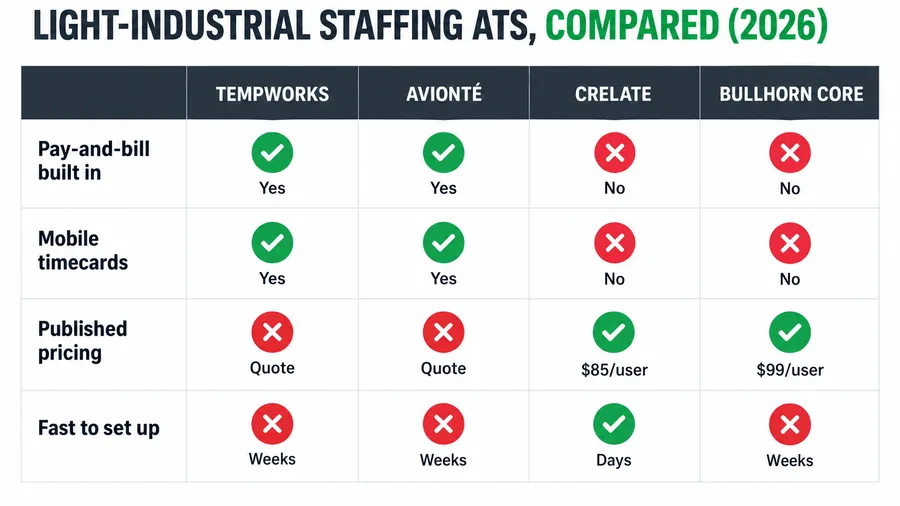
For a light-industrial staffing desk under 20 seats, the best ATS is the one that handles pay-and-bill, mobile timecards, and high-volume onboarding without a per-seat price that climbs every time you hire. In practice that narrows to TempWorks or Avionté if you need real back-office payroll and billing in one system, Crelate if you want published per-user pricing and run light-industrial next to perm, and Bullhorn only if you have the seat volume to justify its depth. The problem is that almost every “best recruiting software” list ranks tools built for perm and executive search, where there are no timesheets, no weekly pay runs, and no bench to redeploy. A light-industrial operator buys the list’s top pick, then discovers it cannot run a Monday pay cycle for 60 warehouse associates. This is the comparison those lists skip, written for the desk that lives on hourly fills.
Key takeaways
- Light-industrial has a dividing line most lists ignore: pay-and-bill. If your model runs weekly payroll and client invoicing off worked hours, a pure ATS (Crelate, Bullhorn Core) leaves you bolting on a separate payroll stack. TempWorks and Avionté bundle the back office; the others do not.
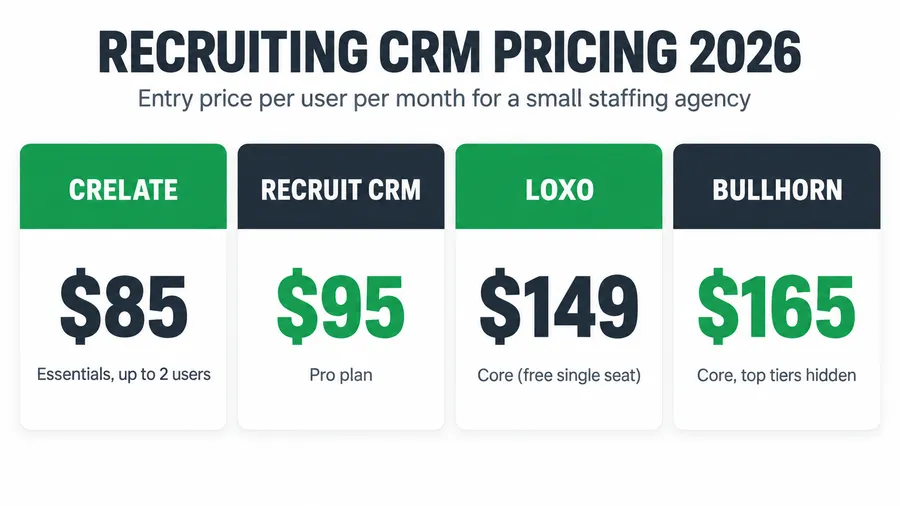
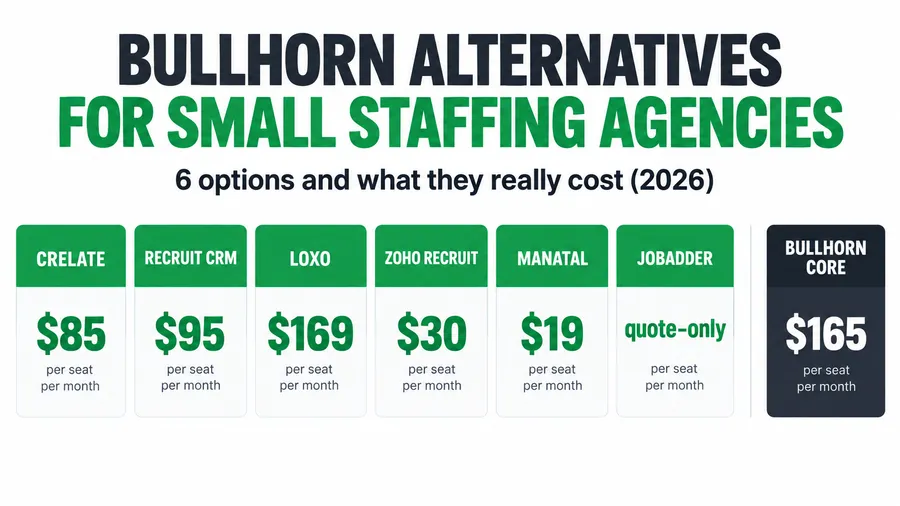
- Published per-seat prices, verified 2026: Crelate Essentials $85/user (up to 2 users), Business $119/user annual; Bullhorn Starter $99/user, Core $165/user. TempWorks and Avionté publish nothing and quote by seat count and modules.
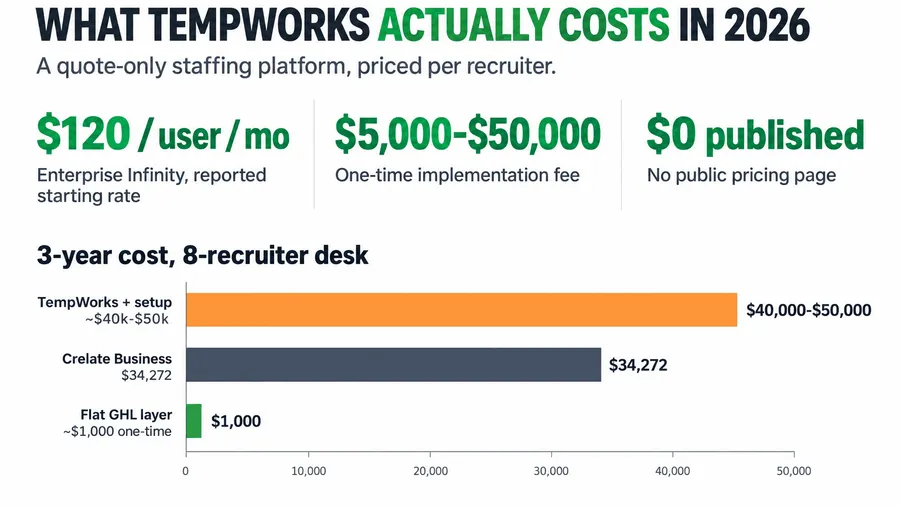
- Per-seat pricing punishes a growing desk. An 8-recruiter desk on Bullhorn Core runs roughly $47,500 over three years in license fees alone, before a single add-on or the payroll module a light-industrial shop actually needs.
- Industrial is the largest slice of US temp staffing at about 36% of temporary and contract workers, yet it is the worst-served by generic ATS lists (American Staffing Association).
- A flat-cost automation layer changes the math. The Hiring Snapshot is a one-time $997 build on GoHighLevel that sits in front of your ATS and does not charge per recruiter, so your capture-and-nurture cost stops climbing when your headcount does.
Table of contents
- The $0 mistake that costs the most: picking off the wrong list
- The light-industrial dividing line: pay-and-bill
- Meet the four tools
- The eight criteria that actually matter under 20 seats
- The comparison table, side by side
- Three-year cost for an 8-recruiter desk
- Three scenarios: solo, 8-seat, and 18-seat
- How to run the demo so you don’t overpay
- The compliance cost every light-industrial buyer forgets
- Common objections, answered
- FAQ
The $0 mistake that costs the most: picking off the wrong list
It is Thursday afternoon and a client just handed you 40 warehouse associates to fill by Monday first shift. You are also two weeks into a new recruiting tool you picked because it topped a “best ATS 2026” roundup. You go to run the first weekly pay cycle and realize the tool has no pay-and-bill. It tracks candidates beautifully. It cannot cut a check or invoice the client off worked hours. So now you are exporting timesheets to a spreadsheet, keying them into a separate payroll app, and reconciling by hand on a Friday night. The software was not wrong. The list was.
That is the single most expensive decision a light-industrial operator makes, and it costs nothing on the sticker. The generic roundups rank tools for perm and executive search, where a placement ends at the offer letter. Yours does not. It starts a weekly cycle of hours in, pay out, bill out, redeploy, repeat, often for workers on assignment for months. Industrial staffing is the largest occupational segment of US temp work, roughly 36% of the 2.2 million temporary and contract employees placed in an average week in 2024 (American Staffing Association), and it is the worst-served by those lists.
So before you compare a single feature, get the one filter right: does this tool run your back office, or just your front office? Everything below is organized around that question.
The light-industrial dividing line: pay-and-bill
Here is the cleanest way to split the market. On one side sit the staffing platforms built around the full assignment lifecycle: capture the candidate, place them, capture their hours, pay them, bill the client, and keep them on the bench for the next order. TempWorks and Avionté live here. On the other side sit the ATS-plus-CRM tools built around the hire event: source, track, submit, place. Crelate and Bullhorn Core live here. Both sides call themselves “staffing software.” Only one side closes the loop between worked hours and money.
If your agency pays workers weekly off timecards and invoices clients off those same hours, pay-and-bill is not a nice-to-have, it is the product. Running a light-industrial desk on a pure ATS means you buy the ATS, then buy or build a separate timekeeping and payroll stack, then babysit the handoff between them every week. That handoff is where margin leaks: a missed overtime rule, a timecard keyed wrong, an invoice that goes out late and pushes an already-slow client further past net-60.
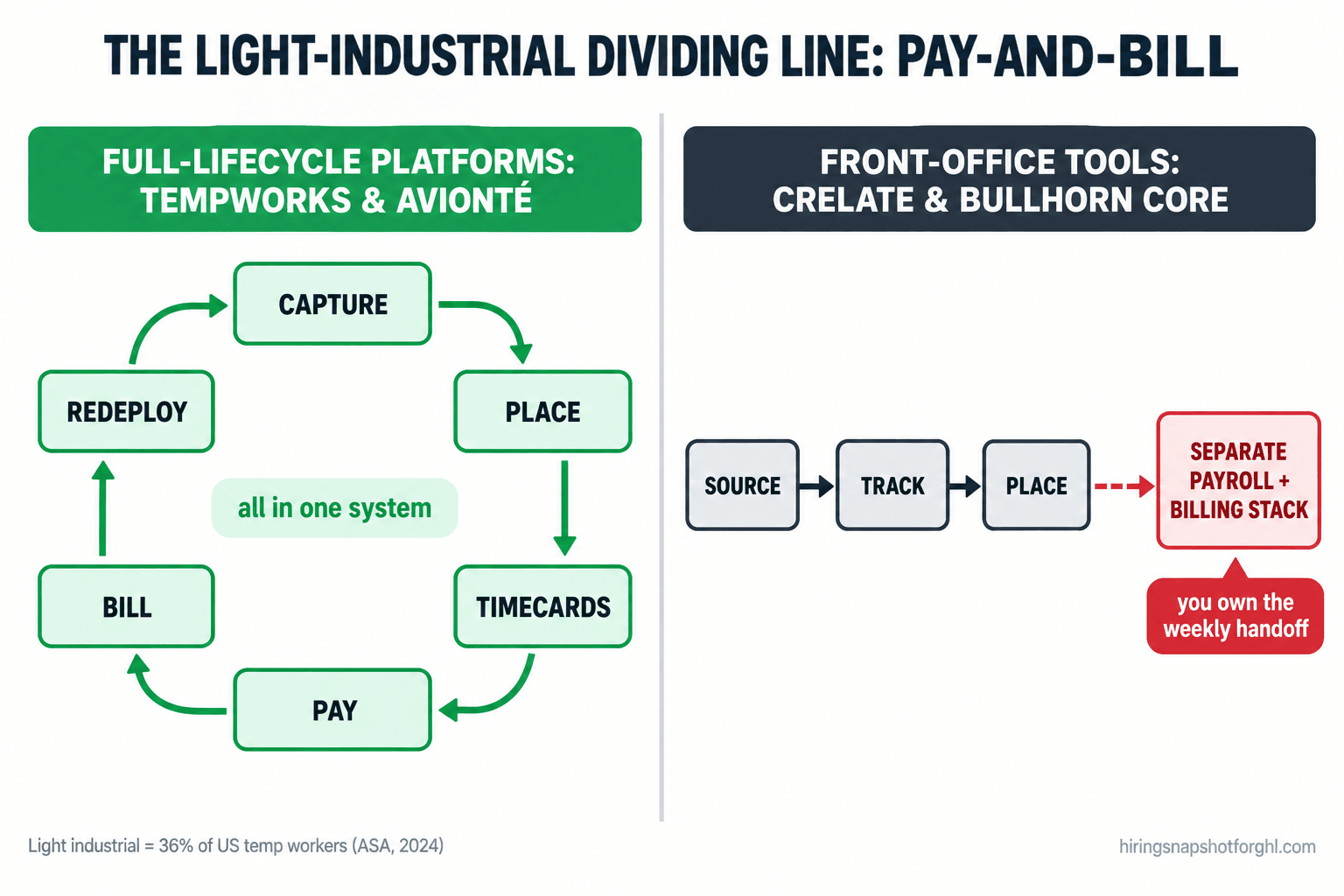
If your model is perm or direct-hire recruiting with the occasional contract placement a payroll partner handles, the dividing line matters far less, and the lighter, cheaper, better-designed front-office tools win. That is exactly why no single answer tops every list. Match the tool to whether your revenue runs through a weekly pay cycle.
Meet the four tools
TempWorks. The light-industrial and high-volume incumbent, purpose-built around pay-and-bill. It runs the full lifecycle including payroll, billing, and (through its WebCenter and buzz apps) mobile timecards and worker self-service. Pricing is quote-only. Its own entry product, Core, has been reported at around $49 per user per month for one-to-two-user shops, with a public starting figure near $125 per month on review sites and larger deployments quoted per seat and per module (Capterra, Software Advice).
Avionté. The other big light-industrial and high-volume platform, with ATS, CRM, payroll, billing, and a strong worker-facing mobile app (AviontéBOLD). Pricing is fully quote-based and positioned premium; third-party trackers report a starting point near $750 per month as a flat fee rather than per seat, with implementation commonly $5,000 to $20,000+ (Software Advice, ITQlick). Treat every Avionté figure as reported, not published.
Crelate. A modern ATS and recruiting CRM with the most transparent pricing in the category: Essentials at $85 per user per month billed annually (up to two users) and Business at $119 per user annually, or $149 billed monthly (AvaHR). It is strong front-office software with no built-in pay-and-bill, so light-industrial shops pair it with a payroll partner.
Bullhorn. The category benchmark, built for scale. Published small-agency tiers are $99 per user for Starter and $165 for Core (ATLAS). Bullhorn One adds back-office pay-and-bill, but that suite is enterprise-grade, quote-only, and reported well north of $200 per seat once loaded. For a sub-20-seat desk, you are usually looking at Core, which is front-office.
The eight criteria that actually matter under 20 seats
Forget the 200-feature grids. For a light-industrial desk below 20 seats, eight things decide whether the tool helps or hurts.
1. Pay-and-bill in one system
This is the dividing line. TempWorks and Avionté run payroll and client billing natively off captured hours, including multi-state tax, overtime rules, and invoice generation. Crelate and Bullhorn Core do not; you integrate a payroll provider and own the handoff. Where it breaks: an integration that silently drops an overtime flag or a pay-rate change, so a worker is underpaid or a client is under-billed and you find out from an angry phone call. If you run weekly pay, score the two full-lifecycle tools far higher here and treat it as close to a veto on the others.
2. Mobile timecards and worker self-service
Light-industrial workers do not sit at a desk. Hours have to come in from a phone at a job site. Avionté (AviontéBOLD) and TempWorks (WebCenter and its worker app) both offer mobile time capture and worker portals for pay stubs and assignment info. Crelate and Bullhorn rely on third-party timekeeping. Where it breaks: paper timecards or texted screenshots that someone keys in by hand, which is the number-one source of payroll errors on a high-volume desk. Mobile capture that flows straight into the pay run is the whole game.
3. High-volume apply and onboarding
A perm desk onboards one hire at a time. You onboard 40 at once for a Monday start, with I-9s, E-Verify, W-4s, direct deposit, and safety docs for each. TempWorks and Avionté build onboarding around this volume with branded portals and bulk document packets. Bullhorn handles it well with its Onboarding add-on; Crelate is lighter and leans on integrations. Where it breaks: a slow apply flow that loses candidates between “interested” and “paperwork done,” the gap where no-shows are born. I broke that funnel down in high-volume recruiting on GoHighLevel.
4. Redeployment and the bench
Your most profitable placement is the second assignment for a worker you already have. A light-industrial tool should make it trivial to see who is ending an assignment, who is available, and who matches the next order. TempWorks and Avionté track availability and assignment status as first-class data. Crelate and Bullhorn track candidates well but lean on you to build the redeployment workflow. Where it breaks: a worker finishes Friday, hears nothing, and takes a job with the agency that texted them Saturday morning. The automation that closes that gap is worth more than any feature on the grid, and I walk through it in contractor redeployment.
5. Published, predictable pricing
Crelate wins outright: real per-user numbers on the page, no demo required, no five-seat minimum. Bullhorn publishes its two small-agency tiers. TempWorks and Avionté publish nothing and quote by seat count, modules, and urgency. Where it breaks: a quote-only vendor scopes your seat count and your Monday deadline before naming a price, so you anchor on the demo instead of the dollar. That is a negotiating position dressed up as a courtesy. For the full cost picture across vendors, see the 2026 staffing ATS pricing teardown.
6. Per-seat cost as you grow
Every tool here except a flat-cost build charges per user per month, which means your software bill rises every time you add a recruiter, precisely when you are trying to widen margin. Crelate at $85 to $119 is the gentlest climb; Bullhorn Core at $165 is the steepest published one; TempWorks and Avionté vary by quote but bundle back office, so compare total cost, not sticker. Where it breaks: you hire three recruiters to chase growth and your tooling cost jumps before the new revenue lands.
7. Implementation time and migration cost
Crelate is the fastest to stand up, often days, with self-serve import. TempWorks and Avionté are heavier back-office systems with implementation projects that run weeks and cost thousands, because payroll and tax setup is genuinely complex. Bullhorn sits in between but trends toward a real project at Core and above. Where it breaks: a cold cutover that sends recruiters back to spreadsheets, or a botched data migration that loses placement history. If you are moving systems, run the old and new in parallel for a week and test one live assignment end to end before you cancel anything.
8. Who it is actually right for
No tool wins all eight. The honest read: TempWorks for a high-volume light-industrial desk that lives on pay-and-bill and wants the incumbent. Avionté for the same model wanting a more modern worker app and willing to pay premium. Crelate for a mixed or perm-leaning desk that wants transparent pricing and will pair a payroll partner. Bullhorn for a desk with the seat volume and integration needs to justify the spend. And a flat-cost automation layer for any of them that is losing candidates before the ATS ever sees them.
The comparison table, side by side
Published prices are 2026 figures; quote-only vendors show reported ranges. Confirm the live number for your seat count before you sign.
| Criterion | TempWorks | Avionté | Crelate | Bullhorn Core |
|---|---|---|---|---|
| Pay-and-bill built in | Yes | Yes | No | No (One only) |
| Mobile timecards / worker app | Yes | Yes | Via integration | Via integration |
| High-volume onboarding | Strong | Strong | Light | Add-on |
| Redeployment / bench tracking | Native | Native | Build it | Build it |
| Published pricing | No (quote) | No (quote) | Yes | Partial |
| Entry price | ~$49–$125/mo reported | ~$750/mo reported | $85/user | $99/user |
| Implementation | Weeks, $$$ | Weeks, $$$$ | Days, self-serve | Weeks |
| Best fit | High-volume LI incumbent | Modern LI, premium | Mixed / perm, transparent | Scale, integrations |
The table makes the shape obvious. If your row that matters is “pay-and-bill built in,” two tools are in the running. If it is “published pricing,” a different two are. There is no column that wins every row, which is why “the best ATS” is the wrong question. The right question is which two rows decide your week.
Three-year cost for an 8-recruiter desk
Per-seat pricing is easy to underestimate because you sign at today’s headcount. Here is the three-year license cost for an 8-recruiter desk on the published tiers, next to a flat-cost build. Quote-only vendors are shown as reported estimates, clearly labeled, because there is no published number to plot honestly.
Two caveats keep this honest. The TempWorks and Avionté numbers buy a payroll and billing system Crelate and Bullhorn Core do not include, so a straight sticker comparison understates what the front-office tools really cost once you add a payroll stack. And the flat build is a capture layer that sits in front of an ATS, not a replacement, so a pay-and-bill shop runs it alongside TempWorks or Avionté, not instead. The point is narrow and real: anything priced per seat gets more expensive every time you hire, and that line only ever goes up.
Three scenarios: solo, 8-seat, and 18-seat
The right answer changes with the shape of the desk. Run it three ways.
The solo contingency recruiter. You place perm or direct-hire roles, maybe a few contract placements a payroll partner covers. You do not run a weekly pay cycle, so do not pay for pay-and-bill. Crelate Essentials at $85 is the sharp pick: a real ATS and CRM, transparent price, live in days, no payroll weight. TempWorks or Avionté here is paying for an engine you never start.
The 8-recruiter light-industrial desk. You run weekly payroll for 150 to 300 active associates and invoice off their hours. Pay-and-bill is the product, full stop. The real contest is TempWorks versus Avionté, decided on worker app quality, your appetite for implementation, and the quotes you negotiate. Crelate and Bullhorn Core are out unless you want a separate payroll stack, which at this volume is a second full-time job. Get both quotes itemized: license, payroll and billing modules, implementation, training, and support.
The 18-seat healthcare-plus-light-industrial shop. Near the ceiling of “small,” running two models: credentialed healthcare contract staff and light-industrial temp labor. You need pay-and-bill, compliance depth, and the seat volume where Bullhorn or a loaded Avionté starts to earn its price, especially with VMS integrations on the healthcare side. The per-seat math is brutal here, eight seats of Bullhorn Core is already $47,500 over three years and you have more than double that, so negotiate hard and weigh putting a flat-cost capture layer in front of the ATS so your lead-handling cost is not also multiplying by 18. That is where leaving per-seat pricing for a flat model saves the most.
How to run the demo so you don’t overpay
Two of these four vendors will not name a price until you are on a call. That call favors the vendor unless you walk in with the questions ready. Steal this. Ask every vendor, quote-only or not, these exact questions before you sign:
- “What is the all-in per-user price on annual billing for the tier that includes everything you just showed me?” Pin the number to the demo you saw, not a stripped base tier.
- “Which of pay-and-bill, mobile timecards, onboarding, texting, and AI sourcing are in that price, and which are separate modules or credits?” This is where the quote doubles.
- “What is the one-time implementation and data-migration fee, and how long does it take to go live?” On the back-office platforms this is thousands and weeks; get it in writing.
- “What is the annual renewal escalator?” Many contracts carry a 5% to 7% yearly increase. Over a three-year term that is real money.
- “If I leave, do I get a full export of my candidate, placement, and payroll data, in what format, and is there a fee?” The answer tells you how trapped you will be.
And the scorecard. Before any demo, write down your two deciding rows from the eight criteria above, the two that define your week. For a high-volume light-industrial desk that is almost always pay-and-bill and mobile timecards. Score each vendor one to five on only those two rows first. If a tool scores low on a deciding row, no amount of polish on the other six saves it. This stops you buying the prettiest ATS instead of the one that runs your Monday.
One more move that costs nothing: ask for three references that run your model at your size. Not the vendor’s biggest logo, a shop with your worker count and your states. A light-industrial desk in a state with strict overtime and pay-transparency rules has a completely different experience than a perm desk in a light-regulation state on the same software.
The compliance cost every light-industrial buyer forgets
There is a cost that never shows on a pricing page and is climbing fast: compliance with the rules on background checks, worker verification, and automated hiring tools. Light-industrial desks feel it hardest because they onboard at volume.
Every hire runs through I-9 and, in many states and for many clients, E-Verify (USCIS). If you pull background or MVR checks, the federal Fair Credit Reporting Act governs disclosure and the adverse-action steps before you can turn someone down on a report (FTC). Get that sequence wrong at volume and you have multiplied one mistake across every candidate. The full sequence is in the FCRA, I-9 and E-Verify background-check checklist.
And if the tool screens, ranks, or scores candidates with AI, which most now market, some jurisdictions regulate that directly. New York City’s Local Law 144 requires an employer or employment agency using an automated employment decision tool to commission an independent bias audit within the prior year, publish a results summary, and give candidates at least 10 business days’ notice; the Department of Consumer and Worker Protection has enforced it since July 5, 2023 (NYC DCWP). Colorado’s SB 24-205 reaches high-risk hiring tools too, though its effective date has moved, so confirm current status (Colorado General Assembly). Ask any AI-forward vendor whether their tool triggers a bias-audit obligation in the states you recruit in, and who owns the audit and the notice.
Common objections, answered
“Can’t I just run light-industrial on Bullhorn or Crelate and add payroll later?” You can, and plenty do, but go in clear-eyed. You are buying two systems and owning the weekly handoff between them. For a low-volume contract desk that is fine. For a true high-volume light-industrial desk running weekly pay for hundreds of associates, that handoff becomes a part-time job and a steady source of pay and billing errors. If pay-and-bill is your week, buy a tool that does it in one place.
“Isn’t TempWorks the obvious pick? It’s the light-industrial standard.” It is the incumbent and it is capable, but “standard” is not “right for you.” TempWorks quotes by seat and module and charges for implementation, training, and in some reported cases even support questions. Avionté competes directly with a more modern worker app. Get both quotes, check references at your size, and decide on your two deciding rows. Do not default to the biggest name without running the number.
“Do I need to be technical to run any of this?” For the back-office platforms, you need setup help, which is exactly why implementation is a paid project, not a weekend. For the front-office capture layer, no. That is the entire reason the Hiring Snapshot ships pre-built rather than as an empty GoHighLevel account: the capture forms, SMS cadences, and booking flows come installed, so you are running automation, not assembling it. If you would rather hand off the day to day, a trained GoHighLevel VA can run the desk operations for you.
“Why are you comparing ATS tools if you sell a GoHighLevel build?” Because the honest answer is that they do different jobs, and pretending otherwise would waste your money. A pay-and-bill desk needs TempWorks or Avionté to run payroll; nothing here replaces that. What those ATS tools do badly is the speed-to-lead layer, instantly answering and qualifying every applicant before they go cold. That is the gap the flat-cost build fills, sitting in front of whatever ATS you pick. Buy the right ATS for your back office. Then stop losing candidates in front of it.
FAQ
What is the best ATS for a small light-industrial staffing agency?
For a true light-industrial desk running weekly pay-and-bill, TempWorks and Avionté are the two serious options because they run payroll and client billing natively off captured hours. If you run light-industrial alongside perm and are comfortable pairing a payroll partner, Crelate at $85 to $119 per user gives you transparent pricing and fast setup. Bullhorn fits larger desks with the seat volume and integration needs to justify it. There is no single best; pick on whether your revenue runs through a weekly pay cycle.
Does Crelate or Bullhorn handle pay-and-bill?
Crelate does not; it is a front-office ATS and CRM, so light-industrial shops pair it with a separate payroll provider. Bullhorn Core does not either, but Bullhorn One, the enterprise suite, adds back-office pay-and-bill. That suite is quote-only and reported well above $200 per seat once loaded, so it is usually out of range for a desk under 20 seats. If native pay-and-bill is a requirement, TempWorks and Avionté are built for it.
How much does TempWorks or Avionté cost?
Both are quote-only. TempWorks’ entry product Core has been reported around $49 per user per month for one-to-two-user shops, with a public starting figure near $125 per month on review sites and larger deployments quoted per seat and module. Avionté is reported starting near $750 per month as a flat fee, with implementation commonly $5,000 to $20,000 or more. Treat all of these as reported estimates and get an itemized quote for your seat count and modules.
Is per-seat ATS pricing a problem for a growing agency?
It can be. Every tool compared here except a flat-cost build charges per user per month, so your software bill rises each time you add a recruiter, exactly when you are trying to widen margin. An 8-recruiter desk on Bullhorn Core runs roughly $47,500 over three years in license fees alone. The gentlest climb among published tiers is Crelate; the biggest saving usually comes from moving the capture-and-nurture layer off per-seat pricing to a flat model.
What should a light-industrial ATS do that a perm-focused one doesn’t?
Four things: run payroll and client billing off captured hours, capture timecards from a worker’s phone at the job site, onboard many hires at once with I-9, E-Verify and direct deposit, and make redeployment of available workers to the next order trivial. Perm-focused tools treat a placement as ending at the offer letter; light-industrial tools treat it as the start of a weekly cycle. That difference is why generic “best ATS” lists mislead light-industrial buyers.
About the author
Marcus Delgado is the Staffing Agency Growth Lead behind the Hiring Snapshot. He ran a light-industrial staffing desk before joining the team to focus on agency growth, and he thinks in placement economics: fill rates, redeploys, and gross margin per requisition. His posts lean on real desk math, not vanity metrics.
Related reading
- Staffing ATS Pricing in 2026: What Bullhorn, Crelate, Loxo and JobAdder Really Cost
- Bullhorn Alternatives for Small Staffing Agencies: 6 Options and What They Really Cost
- GoHighLevel vs Bullhorn for Staffing Agencies: An Honest Comparison
- Contractor Redeployment: The Automation That Turns One Placement Into Three
- High-Volume Recruiting: The GoHighLevel Playbook to Hire Hourly Workers at Scale
Pick the right ATS for your back office, then stop losing candidates in front of it. See how the Hiring Snapshot works, then get the full build for a one-time $997, installed within one business day and flat no matter how many recruiters use it.