· Marcus Delgado · Growth · 16 min read
Why San Jose Staffing Agencies Lose Candidates on the Apply Page (and What a Converting Career Site Fixes)
In San Jose's tight, high-wage talent market, most of the candidates you paid to attract quit before they ever hit submit. Apply completion collapses from 12.47% to 3.61% as the form drags past 15 minutes, and 60% of frontline workers have abandoned an application outright. Here's exactly where your career page leaks — and the converting site that plugs it.
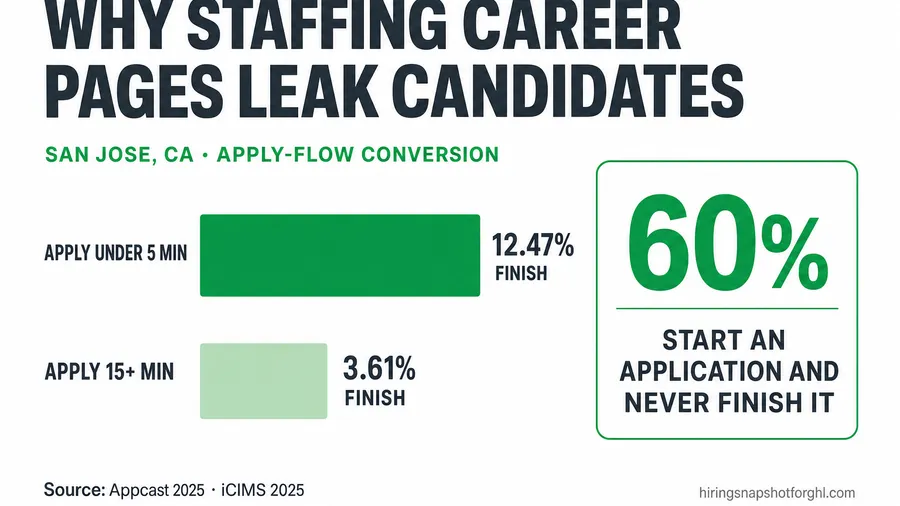
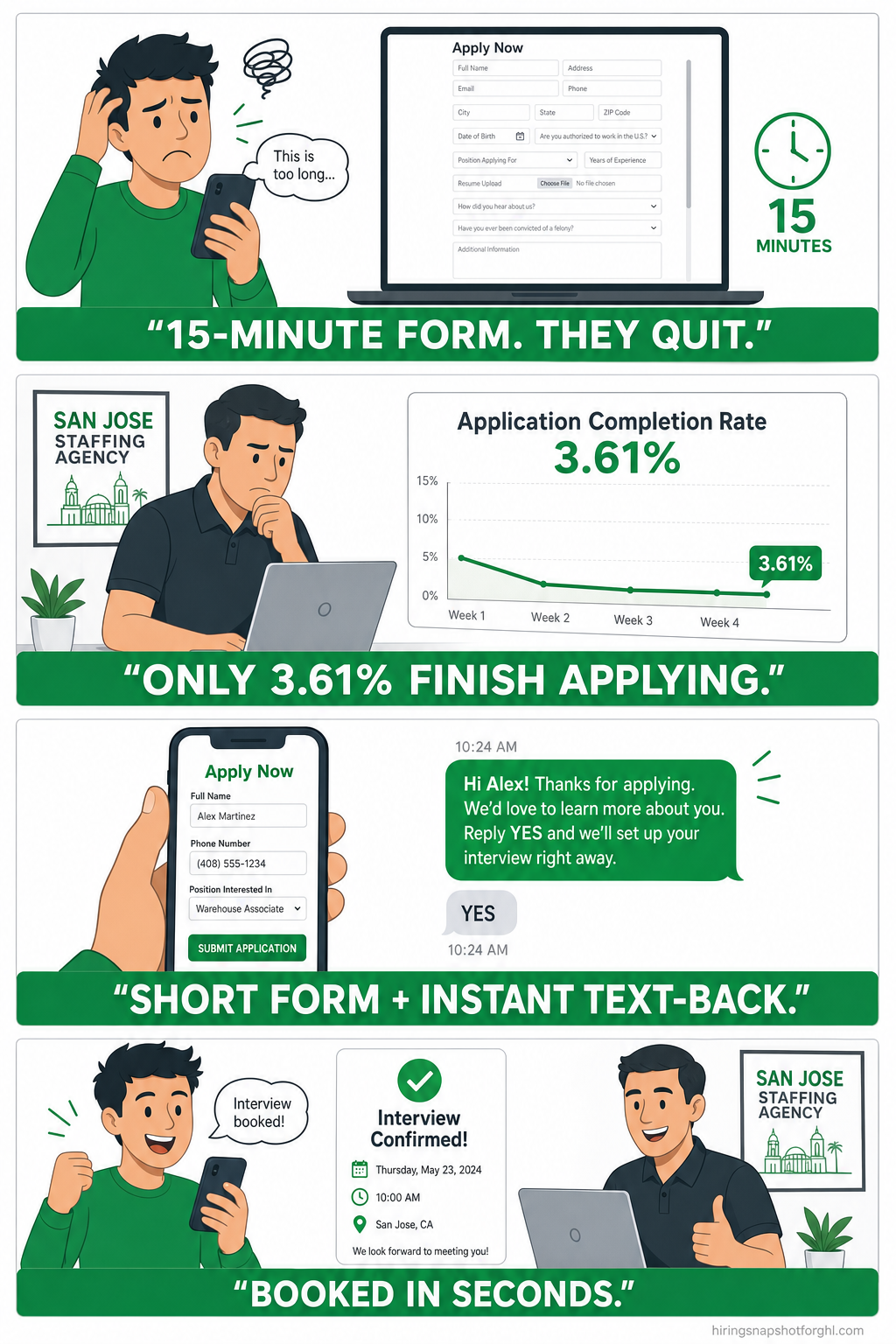
Short answer: a San Jose staffing agency loses most of its candidates not on the ad and not in the interview, but on the apply page in between — because the form is too long, it isn’t built mobile-first, and no one answers fast when a candidate does finish. The data is brutal: apply completion falls from 12.47% for applications that take under five minutes to just 3.61% once they run past fifteen (Appcast 2025 Recruitment Marketing Benchmark Report), and 60% of frontline workers say they’ve started a job application and never finished it (iCIMS 2025 State of Frontline Hiring Report). Every one of those is a candidate you already paid to attract. The fix isn’t more ad spend — it’s a converting career site: a fast page, a three-field mobile apply flow, and an automation that texts the candidate back in seconds instead of the industry-average 42 hours. This is where the leak is, what each leak costs, and how to plug it.
Key takeaways
- The apply form is the leak. Apply completion collapses from 12.47% (application under 5 minutes) to 3.61% (15+ minutes) — a 3.5× drop driven purely by how long the form takes (Appcast 2025).
- Most candidates never hit submit. 60% of frontline workers have started an application and abandoned it; the top reason (50%) is that forms are too long and time-consuming (iCIMS 2025).
- Your apply flow is a phone screen. Roughly 62% of job applications are completed on mobile (Appcast) — a desktop-first form is a form most of your candidates fight with one thumb.
- Speed after apply decides the placement. The average employer takes 42 hours to respond to an inbound lead and 23% never respond at all (Harvard Business Review) — while responding within an hour makes you ~7× likelier to qualify them.
- The flood makes it worse. Applications per job jumped from 115 in 2022 to 244 in 2025, and applications per recruiter went from 146 to 746 (Greenhouse 2025 Workforce & Hiring Report) — no desk can hand-triage that, so fast candidates go cold.
- San Jose raises the stakes. With metro unemployment around 4% and an average wage of $57.32/hour — nearly double the U.S. $33.54 (BLS OEWS, May 2025) — every candidate you leak is expensive to replace and quick to get hired elsewhere.
Table of contents
- Why San Jose desks leak candidates on the apply page
- What a leaking apply flow actually costs
- The five leaks in a typical staffing career site
- Leak 1: The apply form is too long
- Leak 2: It isn’t built mobile-first
- Leak 3: Nobody answers fast after they apply
- Leak 4: The page is slow and hard to find
- Leak 5: No one catches the drop-offs
- Why the volume flood makes this urgent now
- What a converting San Jose career site looks like
- A San Jose playbook by desk type
- FAQ
Why San Jose desks leak candidates on the apply page
San Jose is one of the most expensive, competitive talent markets in the country. Metro unemployment sits around 4% (BLS, San Jose–Sunnyvale–Santa Clara), the average hourly wage is $57.32 versus $33.54 nationally, and computer-and-math roles alone make up 13.2% of area employment (BLS OEWS, May 2025). Whether you run an IT-contract desk in North San Jose, a light-industrial desk near the Coleman corridor, or a healthcare desk serving Santa Clara County hospitals, the candidates you want have options and move fast.
So you spend real money to get them to your website — sponsored Indeed clicks, LinkedIn, paid social, referrals. And then, on most staffing sites, the candidate lands on a career page and quietly leaves. Not because your roles are wrong or your pay is low, but because the path to apply is a wall: a multi-screen form, a “create an account” gate, a slow page, and silence after they submit. The ad did its job. The apply flow undid it.
That’s the uncomfortable truth this article is about. Traffic is not the problem for most San Jose desks. Conversion of that traffic into a finished, contacted application is the problem — and it’s the cheapest lever you have, because you’ve already paid for the click.
What a leaking apply flow actually costs
Start with the single most on-point number in recruiting. Appcast analyzed hundreds of millions of clicks and tens of millions of applies across 1,300+ U.S. employers and found that apply completion depends almost entirely on how long the application takes. Applications finished in under five minutes complete at 12.47%. Once the process drags past fifteen minutes, completion craters to 3.61% (Appcast 2025 Recruitment Marketing Benchmark Report).
Put that in desk terms. Say you drive 1,000 candidate clicks to a role. A tight five-minute apply flow finishes roughly 125 applications. A bloated fifteen-minute flow finishes about 36. Same ad spend, same traffic — and you either have 125 candidates to work or 36. The difference isn’t recruiting skill. It’s the form.
And the candidates confirm it in their own words. In iCIMS’s 2025 survey of 1,000 hourly workers, 60% said they had started a job application and never finished it, and the number-one reason — cited by 50% — was that the application was too lengthy and time-consuming (iCIMS 2025 State of Frontline Hiring Report). More than a third (35%) bailed because they were unsure they qualified, and 31% left because there was no pay transparency. Every one of those is a design decision on your career page, not a fact of nature.
The five leaks in a typical staffing career site
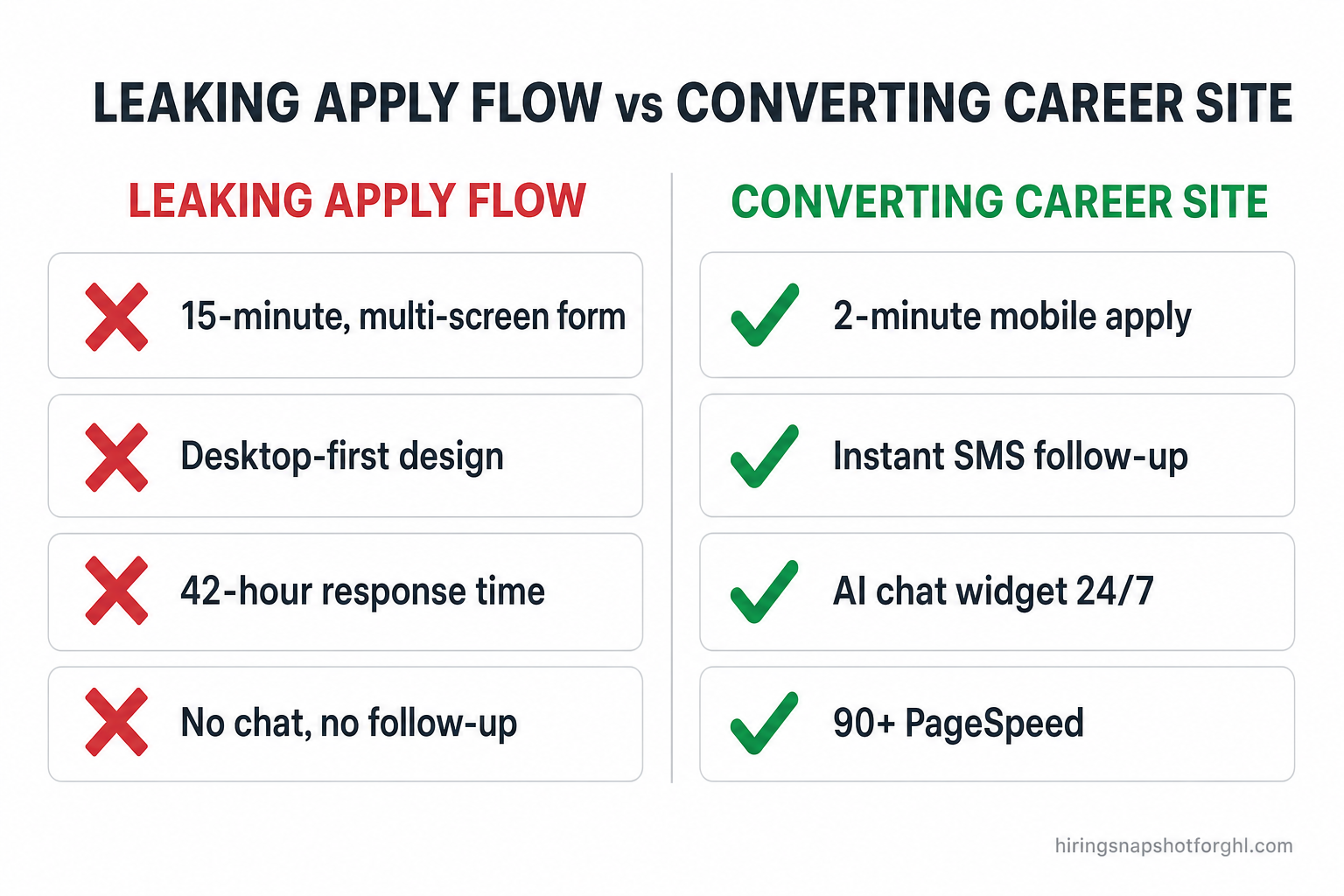
When we audit a staffing agency’s site, the candidates almost always drain out through the same five holes:
- The apply form is too long — too many fields, too many screens, a résumé and a re-typed work history, an account to create.
- It isn’t built mobile-first — the form technically loads on a phone but fights the candidate with tiny fields, zoom, and desktop layouts.
- Nobody answers fast — a candidate who does finish waits hours or days for a first reply, and gets hired elsewhere in the meantime.
- The page is slow and hard to find — heavy pages bounce mobile visitors, and weak local SEO means fewer of the right candidates arrive at all.
- No one catches the drop-offs — the 90% who don’t submit leave no trace and get no second chance.
Fix these five and you don’t need a single extra dollar of ad spend to grow your pipeline. Let’s take them one at a time.
Leak 1: The apply form is too long
This is the big one, and it’s the easiest to fix. Every field you add is a reason to quit. HubSpot’s analysis of more than 40,000 landing pages found conversion is highest when forms are short — around three fields — and drops with each additional field, with a notably sharp fall once you push past that (HubSpot). Recruiting is no different: the Appcast data above is the same phenomenon measured in minutes instead of fields.
For a staffing desk, the first-touch apply form has exactly one job: capture enough to start a conversation. Name, phone, the role, and consent to text. That’s it. You do not need a full work history, three references, and an account login before you’ve even said hello — you can collect all of that after the candidate is engaged, in a follow-up step or a quick screening text. Front-load the friction and you lose them; defer it and you keep them.
A practical target: a first apply that takes under two minutes on a phone, four fields or fewer, no forced account creation, résumé optional. Everything else moves downstream.
Leak 2: It isn’t built mobile-first
Roughly 62% of job applications are completed on a mobile device (Appcast). Your candidate is applying on a phone, on a break, standing in a warehouse or a hospital hallway or a parking lot. If your apply flow was designed on a desktop and merely “works” on mobile, it’s the slowest, most frustrating version of your site that most of your candidates will ever see.
Mobile-first means the form is thumb-sized, the fields use the right keyboards (a number pad for phone, not a full QWERTY), there’s no pinch-and-zoom, the “Apply” button is always reachable, and the whole thing loads instantly on a mid-range phone over cellular. This isn’t a nice-to-have in San Jose — it’s where the majority of your funnel lives.
Leak 3: Nobody answers fast after they apply
Say the candidate makes it through. Now the clock is running, and most agencies lose here. The classic Harvard Business Review audit of 2,241 companies found the average first response to an inbound lead was 42 hours, and 23% of companies never responded at all (HBR, “The Short Life of Online Sales Leads”). Firms that answered within an hour were about 7× more likely to have a qualifying conversation than those who waited just an hour longer — and roughly 60× more likely than those who waited a day.
A job application is an inbound lead. The candidate raised their hand and the timer started. The MIT/InsideSales Lead Response Management study that popularized the “five-minute rule” found the odds of even reaching a lead drop off a cliff within minutes (MIT / InsideSales study). In a market as fast as San Jose, a candidate who applies to you at 2 p.m. and hears back at 2 p.m. tomorrow has already been texted, screened, and half-booked by the competitor whose website fired an automatic reply in seconds.
The moment after a candidate applies
Application lands in an inbox or job-board dashboard. A recruiter gets to it hours later, copies the details into the CRM, and emails the candidate the next morning. Average industry response: 42 hours. The candidate has already accepted elsewhere.
The apply form fires a workflow instantly: an automatic SMS thanks the candidate by name, asks two qualifying questions, and drops a self-book interview link — in seconds, on the phone they just applied from. The recruiter picks up a warm, booked candidate.
This is exactly why a converting career site isn’t just a pretty page — it’s wired to your CRM so the finish line of the apply flow is the start of an automated, SMS-first follow-up cadence. We go deep on that first-response window in why recruiters lose candidates in the first 48 hours.
Leak 4: The page is slow and hard to find
Two quieter leaks sit underneath the form. First, speed: Google’s benchmark research found that as mobile load time goes from one second to three, the probability a visitor bounces rises 32%, and 53% of mobile visits are abandoned when a page takes longer than three seconds (Think with Google). A candidate who bounces before the page even renders never gets the chance to abandon your form — they were gone first. (We break the platform side of this down in Astro vs GoHighLevel websites: page speed compared.)
Second, findability: if your site has no real location pages, thin schema, and no clean structure, fewer of the right San Jose candidates and hiring managers ever arrive — from Google or from AI answer engines like ChatGPT and Perplexity that increasingly send high-intent traffic. Speed and structure decide how many candidates reach the apply page in the first place; the form decides how many finish.
Leak 5: No one catches the drop-offs
Even a great apply flow won’t convert everyone. The candidate who hesitates, has a question about pay or shift, or gets interrupted mid-form is the one you never hear from again — unless something reaches out. An AI chat widget on the career page catches exactly these people: it answers “does this role require a certification?” or “what does it pay?” in the moment, collects the candidate’s info, and books the call — 24/7, while your recruiters sleep. It’s the safety net under the funnel, and it’s the difference between a one-shot form and a page that keeps working after the visitor stalls. (Here’s the full AI chat widget playbook.)
Why the volume flood makes this urgent now
Here’s what changed, and why hand-triage is no longer an option. Applications per job more than doubled between 2022 and 2025 — from about 115 to 244 — while applications per recruiter climbed from 146 to 746 (Greenhouse 2025 Workforce & Hiring Report), driven largely by AI-assisted mass applying.
More volume sounds like a good problem until you remember Leak 3. When 244 people apply to a role, the desk that wins is the one whose system answers all 244 in seconds and surfaces the real candidates — not the desk whose recruiter opens the inbox on Thursday. The flood makes a converting, automated apply flow the difference between a pipeline and a graveyard. It’s also why so many desks pair the site with a high-volume GoHighLevel automation stack behind it.
What a converting San Jose career site looks like
Put the five fixes together and you get a specific kind of website — fast, mobile-first, short to apply, and wired to answer instantly. That’s exactly what we build with our Get a Website service for staffing and recruiting agencies:
- A blazing-fast Astro site with a guaranteed 90+ Google PageSpeed score on mobile and desktop — so candidates reach the apply page instead of bouncing.
- A short, mobile-first apply flow — four fields or fewer at first touch, no forced account, résumé optional — engineered around the Appcast completion data.
- Instant post-apply follow-up — website forms push straight into a CRM (yours, or ours included) so applying triggers an automatic SMS, qualifying questions, and a self-book interview link in seconds.
- An AI chat widget that answers candidate questions, collects lead info, and books appointments 24/7 — catching the drop-offs.
- Proper San Jose location pages, schema, and AEO/GEO structure so the right candidates and hiring managers find you on Google and in AI answers.
It’s $497 one-time + $97/month — hosting, domain, SSL, and updates included, with no per-edit agency invoices. For a desk in a $57/hour market, plugging even a fraction of the apply-flow leak pays for the site many times over in a single placement.
A San Jose playbook by desk type
The leak is universal, but the fix is tuned to who you place:
- Light-industrial & logistics (South San Jose, Coleman corridor). Volume is everything and candidates are overwhelmingly mobile. Ruthlessly short apply form, number-pad phone field, instant text-back, and an AI chat widget answering shift and pay questions. This is where a two-minute apply beats a fifteen-minute one by 3.5×.
- Healthcare & allied (Santa Clara County systems). Credentials matter, but don’t front-load them. Capture name, phone, role, and license type first; collect certifications and references after the candidate is booked. Defer the friction, keep the candidate.
- IT & executive contract (North San Jose, Silicon Valley clients). These candidates are passive and skeptical. Speed and polish signal a real firm — a fast site, an instant intelligent reply, and a chat widget that can actually answer a technical scoping question outperform a slow form every time.
Across all three, the pattern is identical: fewer fields, mobile-first, instant response, a net for the drop-offs. That’s a converting career site, and it’s the cheapest pipeline growth available to a San Jose desk because it works on traffic you’ve already bought. If you’re rebuilding the engine behind it too, start with using GoHighLevel as your ATS so every finished application lands somewhere that closes.
FAQ
Why do candidates abandon my staffing agency’s apply page?
Overwhelmingly because the application is too long. Apply completion falls from 12.47% for applications under five minutes to 3.61% once they pass fifteen (Appcast 2025), and 60% of frontline workers say they’ve abandoned an application — half of them because it was too lengthy (iCIMS 2025). Long forms, forced account creation, desktop-first design, and slow pages are the main causes, and all are fixable.
How short should a staffing apply form be?
The first-touch form should capture only what starts a conversation: name, phone, the role, and consent to text — four fields or fewer, ideally finishable in under two minutes on a phone. Collect work history, references, and credentials in a follow-up step after the candidate is engaged, not before.
Does apply-page conversion really matter more than more ad spend?
For most San Jose desks, yes. You’ve already paid for the click; doubling the share of clicks that become finished applications is far cheaper than doubling traffic. Improving apply completion is the highest-ROI lever on the funnel because it multiplies the candidates you already attracted.
How fast should I respond after a candidate applies?
In seconds, automatically. The average employer takes 42 hours to respond and 23% never do (HBR); responding within an hour makes you about 7× likelier to qualify the candidate. A career site wired to your CRM fires an SMS the instant the form is submitted — long before a competitor’s recruiter opens their inbox.
What does a converting staffing career site cost?
Our Get a Website build is $497 one-time plus $97/month, including a fast Astro site with a 90+ PageSpeed guarantee, a mobile-first apply flow, an AI chat widget, location pages, schema/AEO/GEO, and CRM integration. In a market where the average wage is $57/hour, plugging the apply-flow leak typically pays for the site in a single placement.
About the author
Marcus Delgado is the Staffing Agency Growth Lead behind the Hiring Snapshot, based in Tampa, FL. He ran a light-industrial staffing desk before moving into agency growth, and he thinks in placement economics — fill rates, redeploys, and gross margin per requisition. His posts lean on real desk math, not vanity metrics, and he is happiest when a marketing dollar you already spent finally converts.
Related reading
- Why Recruiters Lose Candidates in the First 48 Hours (And What to Do About It)
- SMS-First Recruiting: Why Email-Only Agencies Are Losing the 2026 Talent Market
- Astro vs GoHighLevel Websites for Dallas Staffing Agencies: Page Speed & SEO Compared
- How to Add an AI Chat Widget to Your Staffing Agency Website
- How to Use GoHighLevel as an ATS: Build a Recruiting Pipeline That Fills Reqs Faster
Losing candidates on your apply page? Get a converting career site, see how the Hiring Snapshot works, or book a walkthrough.