· Marcus Delgado · Growth · 23 min read
How to Reduce Cost-per-Hire at a Staffing Agency: Where Your Recruiting Budget Actually Leaks (2026)
Cost-per-hire climbed to $5,475 in 2025, and a staffing desk pays most of it in places nobody tracks. Here is how to measure what each placement really costs you, and the six-stage system that cuts job-board waste, recruiter hours, and the fall-offs that make you pay twice.
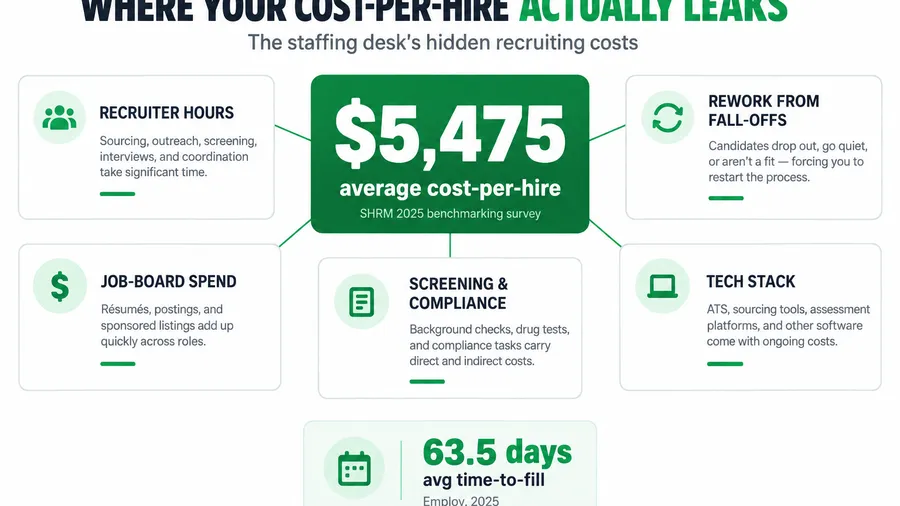
It is Friday afternoon and you are doing the thing most staffing owners never do on purpose. You are adding up what it actually cost to fill the three orders you closed this week. Not the bill rate, not the spread, the cost. The Indeed spend that pulled in forty applicants to find two who could pass a drug screen. The nine hours your best recruiter spent on the phone. The background checks on candidates who then ghosted the first shift, so you ran the whole thing again. By the time you have it on paper, the number is ugly, and it is bigger than you thought.
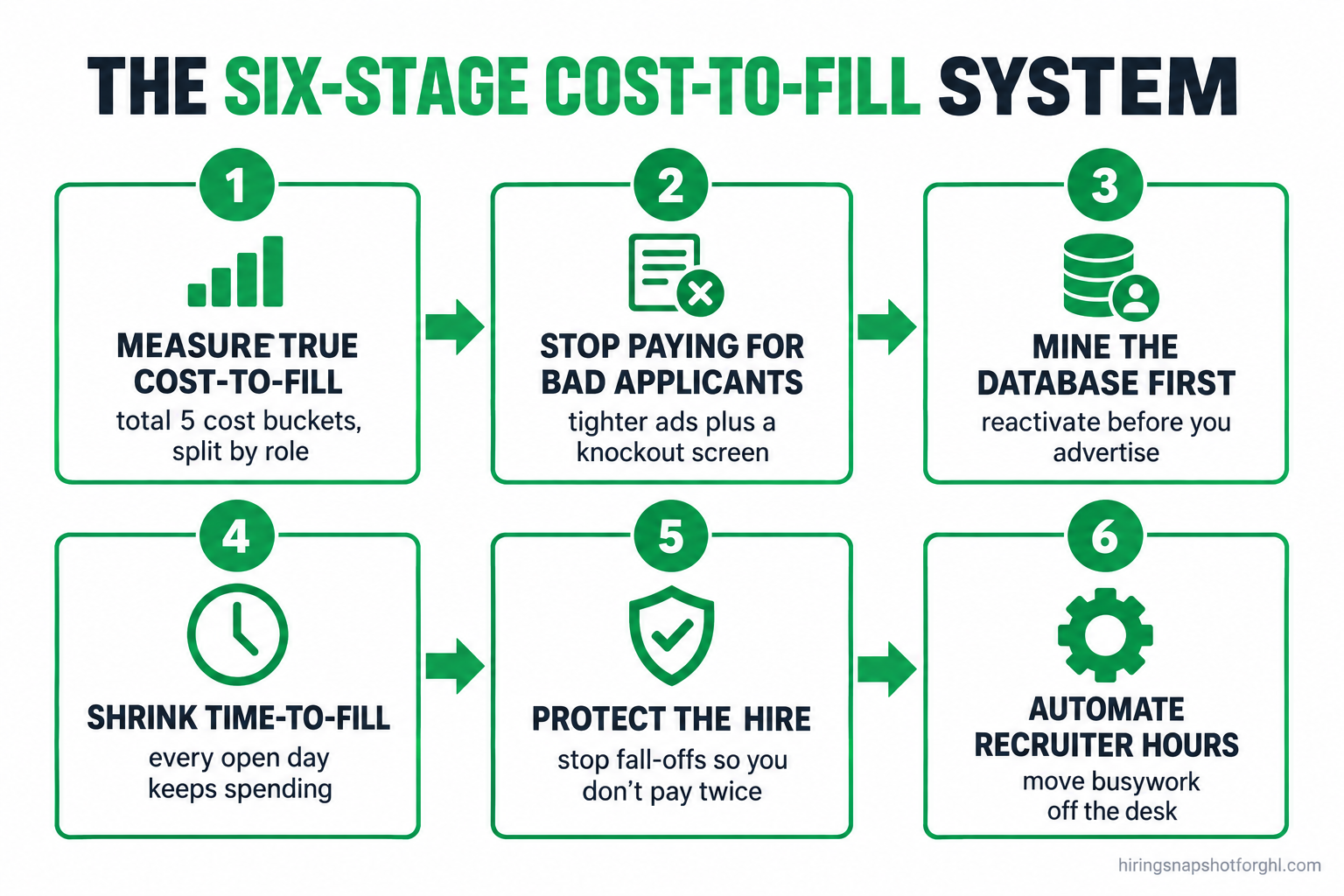
The short answer: your cost-per-hire is not one line item, it is a stack of small leaks, and the biggest ones are the costs you never see on an invoice. Job-board waste, recruiter hours burned on bad orders and unqualified applicants, and the placements that fall off so you pay to source them twice. You cut it by measuring your true cost-to-fill first, then closing each leak in order: stop paying for applicants you will never place, mine the database you already own before you advertise, shrink time-to-fill so every extra day stops re-advertising the order, protect the hire you already made, and automate the repetitive recruiter hours that quietly cost the most. This is the whole system, with the real numbers, the copy you can steal, and the places it breaks.
Key takeaways
- Cost-per-hire is rising and it is not small. The SHRM 2025 benchmarking survey put the average nonexecutive cost-per-hire at $5,475, up from the roughly $4,700 SHRM reported a few years earlier.
- A staffing desk’s real number is its own. The SHRM figure is a corporate benchmark. Your cost-to-fill is built from the same parts, advertising, recruiter time, screening, and rework, and most desks have never measured it.
- Time is cost. Average time-to-fill reached 63.5 days in 2025, and 83.5 days for small and mid-size employers. Every extra day keeps the ad live and the recruiter busy on an order you have not billed.
- Fall-offs make you pay twice. A no-show or a backed-out placement means you source, screen, and advertise the same seat again. Protecting the hire is a cost lever, not just a service one.
- The cheapest candidate is the one you already have. Reactivating your own database costs a text message. Sourcing a cold applicant costs the full advertising and screening bill again.
Table of contents
- Why cost-per-hire is the number that eats your margin
- What a placement actually costs you (and how to measure it)
- The cost-to-fill system, six stages
- Stage 1: Measure your true cost-to-fill, not the vendor’s number
- Stage 2: Stop paying for applicants you will never place
- Stage 3: Mine the database before you advertise
- Stage 4: Shrink time-to-fill so days stop costing money
- Stage 5: Protect the hire so you do not pay twice
- Stage 6: Automate the recruiter hours that cost the most
- Three real scenarios: solo, 8-seat, and 25-seat
- Common objections, answered
- FAQ
Why cost-per-hire is the number that eats your margin
Every placement you make has a hidden price tag, and in staffing it comes straight out of the one number you actually keep: your spread. You bill a client at a markup over pay rate, and what is left after wages and burden is your gross margin. Cost-per-hire is the chunk of that margin you spend to win the placement in the first place. Spend too much finding and screening the worker, and a healthy-looking spread turns into a thin one.
The scale of the industry is the reason this matters. There are roughly 27,000 staffing and recruiting companies in the United States running about 54,000 offices, and together they put around 2.2 million temporary and contract workers to work in an average week (American Staffing Association). Every one of those desks is competing for the same candidates on the same job boards, which bids up the cost of attention. The agencies that win on margin are not the ones paying the most to source. They are the ones who waste the least.
And the benchmark is climbing. The SHRM 2025 benchmarking survey, released in October 2025, put the average nonexecutive cost-per-hire at $5,475. A few years earlier SHRM reported the average at nearly $4,700. That is a corporate-recruiting figure, not a staffing-agency one, but the direction is what counts, and the parts that make it up are the same parts you pay for on every order.
What a placement actually costs you (and how to measure it)
Here is the trap most desks fall into: they think cost-per-hire is the Indeed bill. It is not. The advertising spend is the easy part, because it shows up on a credit card statement. The expensive parts are the ones that never land on an invoice, which is exactly why they go unmanaged.
A staffing placement has five cost buckets, and you pay all five whether or not you measure them. First, advertising and sourcing: job-board spend, sponsored posts, and any paid tools you use to find people. Second, recruiter labor: the hours spent writing the order, screening applicants, running phone screens, and scheduling, which is real money even though it feels free because you already pay the salary. Third, screening and compliance: background checks, drug screens, E-Verify, and skills tests. Fourth, rework: the cost of re-advertising and re-screening when a placement falls off, which quietly doubles the first three buckets on any order that does not stick. Fifth, technology: the share of your ATS, CRM, and texting tools that each placement carries.
To measure it, pick a rolling month and total each bucket, then divide by placements made. Advertising is a statement line. Recruiter labor you estimate from a blended hourly cost times the hours a typical fill takes. Screening is per-candidate times candidates run. Rework you capture by tagging every order that had to be refilled. The first time you run this, the number will surprise you, and the surprise is the point. You cannot cut what you refuse to count. The broader set of desk metrics this sits inside is laid out in the 2026 staffing industry benchmarks.
The cost-to-fill system, six stages
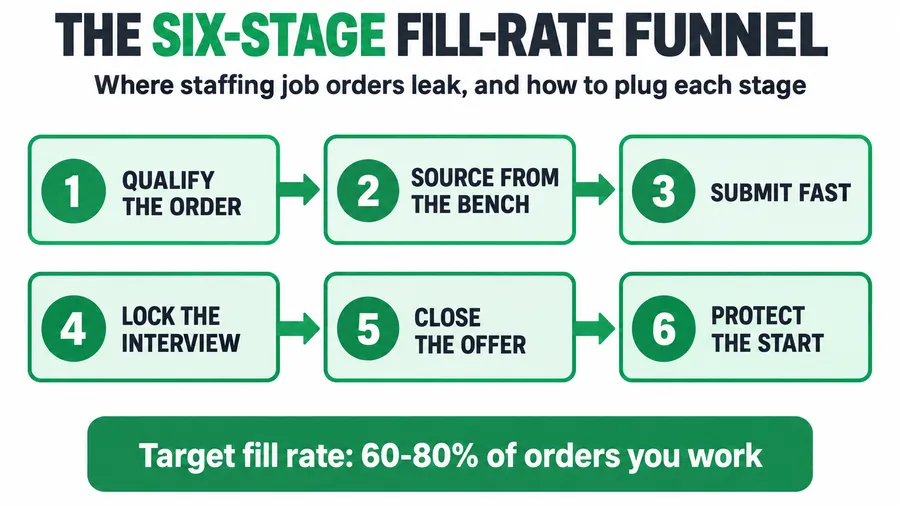
Cutting cost-per-hire is not one big move, it is six small disciplines applied in order. Each one closes a specific leak, and they compound: a tighter job ad means fewer junk applicants, which means fewer recruiter hours, which means a faster fill, which means less time for the candidate to drift, which means fewer fall-offs. Run them in order. Skipping the measurement stage is the most common mistake, because it leaves you guessing which leak to plug first.
Stage 1: Measure your true cost-to-fill, not the vendor’s number
You already know the formula from the section above. The discipline is doing it every month and splitting it by order type, because your cost-to-fill is not one number, it is several. A light-industrial temp order and a skilled perm search have wildly different cost profiles, and averaging them hides where the money actually goes.
Split your reporting at least two ways. By role type, so you can see that a CDL driver costs four times what a warehouse picker costs to fill, and price your markup accordingly. And by source, so you can see which job board, referral channel, or database segment produces placements per dollar and which just produces applicants. Cost-per-applicant is a vanity number. Cost-per-placement is the one that pays your rent.
How it breaks. The usual failure is measuring once, getting scared, and never measuring again. A number you look at once is trivia. A number you track monthly is a management tool, because it tells you whether the changes you are making in the stages below are actually working. The second failure is leaving out recruiter labor because it feels free. It is not free. It is usually your single largest bucket, and pretending otherwise means you will optimize the small leak (ad spend) while the big one (wasted hours) pours out.
Stage 2: Stop paying for applicants you will never place
Most job-board waste is self-inflicted. A vague, wide-open ad pulls in a flood of applicants, which feels good, and then your recruiters spend hours sorting ninety résumés to find the four people who can actually do the job and pass a screen. You paid for all ninety clicks, and you paid for the sorting. Indeed’s sponsored jobs run on a pay-per-click model with a daily minimum, so a loose ad that attracts the wrong people is a meter running against you (Indeed).
The fix is to make your ad do the filtering before a human ever does. Name the real requirements plainly in the posting: the shift, the pay, the physical demands, the location, the must-have certifications. An ad that says “must be able to lift 50 lbs repeatedly, 5am start, $18/hr, steel-toe boots required” repels the people who would have wasted your time and attracts the ones who can do it. You will get fewer applicants and more placements per dollar, which is the only ratio that matters.
Then add a screening gate at the top of the funnel so unqualified applicants disqualify themselves before they hit a recruiter. A short set of knockout questions, answered by text or on the apply form, filters for the non-negotiables automatically.
Steal this: the top-of-funnel knockout screen (text or form)
“Thanks for applying to the [role] at [Agency]. Four quick questions so we can move fast:
- This shift starts at 5:00am, Monday to Friday. Can you commit to that? (Y/N)
- The role requires lifting up to 50 lbs repeatedly. Is that okay for you? (Y/N)
- Do you have reliable transportation to [area]? (Y/N)
- This position requires a background check and drug screen. Are you comfortable with that? (Y/N)
Reply with your four answers and we’ll call the people who are a fit today.”
A “no” on any knockout saves you a screening call, a background check, and the recruiter hour that would have followed. That is cost-per-hire falling before you have placed anyone, just by not spending on people who were never going to work out.
How it breaks. Two ways. Desks make the ad so narrow that nobody applies, which is overcorrecting; the goal is to repel the unqualified, not everyone. Or they build the knockout screen and then let qualified applicants sit because nobody is watching the replies, so the fast candidates take another offer while you sort. The screen has to route a “pass” straight to a recruiter in minutes, not into a queue.
Stage 3: Mine the database before you advertise
Here is the cheapest candidate you will ever place: the one already in your system. You already paid to source, screen, and often place them once. Reaching them again costs a text message. And yet most desks, the moment a new order lands, open Indeed and start the meter running, while a database full of pre-screened, work-ready people sits untouched.
Before you spend a dollar on advertising, search your own records. Who did you place at a similar role that has since rolled off? Who applied for a comparable order last month and was qualified but came in second? Who is a redeployable contractor finishing an assignment this week? Those people are warm, screened, and free to reach. Reactivating them is the single highest-margin sourcing move a staffing desk has, and the full re-engagement playbook is in the guide to reactivating a dead candidate database.
Steal this: the database reactivation text
“Hi [Name], it’s [You] at [Agency]. We’ve got a new [role] opening at [area], [shift], paying [$X/hr], starting [date]. You were a strong fit for something similar, so I wanted to give you first shot before it goes public. Interested? Reply YES and I’ll call you today with the details.”
(Send only to candidates who opted in to messaging. Honor every opt-out.)
A placement sourced from your own bench skips the advertising bucket entirely and usually skips a fresh background check too, because you screened them the first time. Do this well and a meaningful share of your orders never touch a job board, which is cost-per-hire cut in half for every one of them. Keeping contractors warm between assignments so they are there to redeploy is covered in the contractor redeployment playbook.
How it breaks. The database is only as good as the data in it. If your records are a graveyard of stale phone numbers and no notes on who was good, mining it is slow and the texts bounce. The fix is upstream: tag candidates by skill, availability, and quality as you work them, so the search in six months is a filter, not an archaeology dig. A disorganized CRM makes this stage worthless, which is why the desks that win on cost keep their candidate data clean on purpose.
Stage 4: Shrink time-to-fill so days stop costing money
Time is not just a service metric, it is a cost. Every day an order stays open is a day the ad keeps spending, a day a recruiter keeps touching the file, and a day the candidate you want has to take a competing offer. Average time-to-fill reached 63.5 days in 2025, and 83.5 days for small and mid-size employers, per Employ’s 2025 hiring benchmarks. In staffing you move faster than that, but the principle holds at your scale: a seven-day fill costs less than a fourteen-day fill on the same order, because you are paying for attention and labor the whole time.
Speed comes from removing the waits between steps, not from working harder. The gaps are where cost accrues: the applicant who waits two days for a callback and takes another job, the candidate who waits a week for a background check to clear, the client who waits for you to chase down availability. Close each gap. Respond to a qualified applicant in minutes, run screens in parallel instead of in sequence, and keep the candidate warm with contact the whole way through so they do not drift. The full set of levers for cutting days-to-fill is in the guide to reducing time-to-fill, and the funnel view of turning more orders into placements is in the fill-rate playbook.
How it breaks. The silent killer is the handoff. An applicant passes the knockout screen at 9am and nobody calls until the next afternoon, so the meter keeps running and the candidate cools off. Speed is a system property, not a personal one: the desk that fills fast has automated the “a qualified person just applied” alert so a recruiter acts while the candidate is still hot. Relying on someone to check the inbox is how fast becomes slow.
Stage 5: Protect the hire so you do not pay twice
Every cost in the stages above, you pay again when a placement falls off. A worker who no-shows the first shift, a candidate who accepts and then takes a counteroffer, a temp who walks off an assignment in week two: each one sends you back to the top of the funnel to source, screen, and advertise the same seat a second time. That is the most expensive form of cost-per-hire there is, because you get nothing for the first spend.
So treat retention as a cost lever. The hours between “offer accepted” and “first shift worked” are where placements quietly die, and the fix is relentless, human confirmation: a cadence that keeps the candidate engaged, surfaces problems early, and makes the start feel real. The same discipline applies to shift attendance on live assignments. The confirm-and-recover system that stops placed workers ghosting shifts is in the no-call no-show playbook, and the mechanics of locking in a candidate between offer and start date are in the onboarding automation guide.
Steal this: the pre-start confirmation that prevents a refill
Three days before start, text: “Hi [Name], really glad you’re starting at [Client] on [date]. I’ll send full details the night before. Anything come up or any questions in the meantime? I’m here.”
Night before, text: “All set for tomorrow, [Name]: arrive [time] at [address], ask for [supervisor], wear [gear], bring ID. Save my number. If anything goes sideways tonight or in the morning, call me first before you decide not to come. We can almost always fix it.”
That “call me first” line is the cheapest insurance you own. A ride problem you hear about at 10pm is a solvable problem. The same ride problem you discover at the gate is a blown placement and a second sourcing bill.
How it breaks. Confirmation that depends on a human remembering to send it is confirmation that fails on the busy weeks, which are exactly the weeks you have the most placements to protect. The cadence has to run on its own and flag the non-responders, or it quietly stops happening the moment the desk gets slammed.
Stage 6: Automate the recruiter hours that cost the most
Recruiter labor is usually your biggest cost bucket, and most of it is spent on work that does not require a recruiter. Sorting applicants, sending the same screening questions, scheduling phone screens, chasing documents, confirming shifts, logging notes: none of that needs a skilled human, and all of it eats the hours you are paying for. Every one of those hours moved off the recruiter’s plate is cost-per-hire falling and placement capacity rising at the same time.
Point automation at the repetitive, high-volume, low-judgment work. The knockout screen from Stage 2, the reactivation texts from Stage 3, the fast-response alerts from Stage 4, and the confirmation cadence from Stage 5 are all automatable, which means the whole system above also happens to be the automation roadmap. What you keep on the recruiter is the judgment: the real conversation, the client relationship, the close. What you automate is everything around it.
The payoff is capacity. A recruiter freed from forty hours a month of texting and sorting is a recruiter who can carry more requisitions without burning out, and recruiter burnout is its own expensive problem covered in the guide to recruiter turnover. This is why a desk without an ops person often gets the most out of a trained GoHighLevel virtual assistant to own the routine, and why the cost math on markup and margin, laid out in the bill-rate and markup guide, improves the moment the hours per placement come down.
How it breaks. Automating the judgment calls instead of the busywork. A desk that tries to automate the actual screening decision ends up placing bad fits that fall off, which increases rework and cost. Automate the routing, the reminders, and the data entry. Keep a human on the decision. Get that boundary right and automation cuts cost. Get it wrong and it just moves the cost from hours to fall-offs.
Three real scenarios: solo, 8-seat, and 25-seat
The system is the same at every size. The biggest leak is different.
The solo contingency recruiter, perm placements, 20 to 25% fees. Your cost-per-hire is dominated by one bucket: your own time, because you are the whole desk. Advertising is secondary; your hours are everything. So your highest-value moves are Stage 3 and Stage 5. Mine your network and past candidates before you spend on sourcing, because a warm referral costs you nothing but a text. And protect every placement obsessively, because a single fall-off at your volume is not a rounding error, it is a month of income sourced twice. You do not need a big tech stack. You need a clean, tagged list of people you can reach and a confirmation habit you never skip.
The 8-recruiter light-industrial agency, temp and temp-to-hire, 40 to 80% markup. This is where all six stages earn their keep, and where the rework bucket is the quiet killer. High volume means high fall-off exposure, and every no-show refills at full cost. Your pressure points are Stage 2, so your recruiters are not drowning in junk applicants, and Stage 6, because at this volume the repetitive hours are enormous and a human cannot keep up with confirmations across multiple clients. Measure cost-to-fill by client, because one high-fall-off account can be silently doubling your blended number. This is the agency the whole system was built for.
The 25-recruiter healthcare or high-volume shop. At this scale a one-point drop in cost-per-hire is a large dollar figure, and the leaks are structural. Advertising is a managed budget, screening is layered with credentialing, and rework carries compliance risk on top of cost. Your biggest wins come from measurement and automation at scale: cost-to-fill dashboards by role and source, automated screening and confirmation running across the whole desk, and a formal bench so redeployment, not re-advertising, fills the next order. The root-cause tagging from every fall-off becomes a client-by-client scorecard you use in account reviews.
Common objections, answered
“I don’t have time to measure all this, I’m trying to fill orders.” You do not need a finance team, you need one spreadsheet and one month. Total five buckets, divide by placements, and split by role type. The reason to do it is not the number itself, it is that without it you are guessing which leak to fix, and guessing wrong means spending effort on the small leak while the big one drains. An hour of measuring saves you from a quarter of optimizing the wrong thing.
“Cutting job-board spend means fewer applicants, and I need applicants.” You need placements, not applicants, and they are not the same thing. A loose ad that pulls ninety résumés to find four hires costs you in clicks and in the hours spent sorting. A tight ad plus a knockout screen pulls fewer, better applicants and places the same four for less. Fewer, more qualified applicants is the goal. Volume for its own sake is the thing you are paying too much for.
“My recruiters’ time is a fixed salary, so it’s not really a cost.” It is the most real cost you have, because it is your capacity. Every hour a recruiter spends sorting junk or texting reminders is an hour not spent closing, and capacity is what caps how many orders you can fill. Treating recruiter time as free is exactly how desks end up overstaffed and under-placing. Free up the hours and you either place more with the same team or run leaner, and both drop cost-per-hire.
“Do I really need software for this? It sounds like a lot of tools.” The system is the tooling, and most of it is one platform doing the routing, texting, and tracking rather than five disconnected apps. The point is not more software, it is fewer manual hours and fewer dropped handoffs. That is why the Hiring Snapshot ships these cadences pre-built on GoHighLevel instead of as an empty account, so the screening gate, the reactivation texts, the fast-response alerts, and the confirmations run without a recruiter remembering to start them.
FAQ
What is cost-per-hire for a staffing agency?
Cost-per-hire is the total amount your agency spends to fill a placement, divided by the number of placements made. It includes advertising and job-board spend, recruiter hours, screening and background checks, the rework cost when a placement falls off, and the share of your technology stack. For a staffing desk it comes directly out of your spread, so lowering it protects margin on every order.
What is the average cost-per-hire in 2026?
The SHRM 2025 benchmarking survey put the average nonexecutive cost-per-hire at $5,475, up from the roughly $4,700 SHRM reported a few years earlier. That is a corporate-recruiting benchmark rather than a staffing-agency one, but it shows both the scale and the upward direction. Your own cost-to-fill will differ by role type and volume, which is why measuring your real number matters more than the benchmark.
How can a small staffing agency reduce cost-per-hire?
Measure your true cost-to-fill first so you know which leak is biggest, then close them in order: tighten job ads and add a knockout screen so you stop paying for applicants you will never place, mine your own database before you advertise, shrink time-to-fill so days stop costing money, protect placements so you do not refill at full cost, and automate the repetitive recruiter hours. For a solo or small desk, mining the database and protecting placements usually move the number the most.
Why does time-to-fill affect cost-per-hire?
Because every day an order stays open keeps the ad spending, keeps a recruiter touching the file, and gives the candidate you want more time to take a competing offer. Average time-to-fill reached 63.5 days in 2025 and 83.5 days for small and mid-size employers. In staffing you fill faster, but the same math holds: a longer fill costs more in advertising and labor on the same placement, so speed is a cost lever, not only a service one.
Isn’t a candidate database a cheaper source than job boards?
Yes, by a wide margin. A candidate already in your system was sourced and screened once, so reaching them again costs a text message instead of a fresh advertising and screening bill. Reactivating a pre-qualified, opted-in candidate is the highest-margin sourcing move a staffing desk has, and a well-tagged database lets a meaningful share of your orders fill without ever touching a job board.
What is the most expensive kind of cost-per-hire?
A placement that falls off. When a worker no-shows the first shift or a candidate backs out, you repeat the full sourcing, screening, and advertising spend on the same seat and get nothing for the first round. That is why protecting the hire with a confirmation cadence between offer and start is a cost lever, not just a service one: preventing one refill saves you an entire second cost-per-hire.
About the author
Marcus Delgado is the Staffing Agency Growth Lead behind the Hiring Snapshot. He ran a light-industrial staffing desk before joining the team to focus on agency growth, and he thinks in placement economics: fill rates, redeploys, and gross margin per requisition. His posts lean on real desk math, not vanity metrics.
Related reading
- Staffing Industry Benchmarks 2026: The Recruiting Metrics That Actually Matter
- How to Reduce Time-to-Fill: The Playbook to Cut Days-to-Fill in Half
- How to Reactivate a Dead Candidate Database
- No-Call No-Show in Staffing: The System That Stops Placed Workers Ghosting
- Staffing Agency Bill Rate & Markup: The Margin Math That Keeps a Desk Profitable